

Setup Considerations for District
How Supplemental Attendance Supports Attendance Recovery
Recovering an Absence Using Attendance Recovery
Attendance Recovery Bank (ARB)
Fields Displayed on the Attendance Recovery Bank (ARB) Page
Reporting and Downstream Impacts
Overview
Attendance Recovery (AR) allows California districts to provide students with opportunities to make up excused or unexcused absences by participating in approved recovery sessions. In Aeries, Attendance Recovery is supported through Supplemental Attendance tables and attendance-level ADA Make-Up codes. This document explains what has changed, how Supplemental Attendance is used to support Attendance Recovery, and what users need to know to correctly track, apply, and report recovered attendance.
This guidance is intended for attendance clerks, administrators, and district staff responsible for Attendance Recovery setup, processing, and reporting.
What's Changed ↑
Recent updates introduce tighter integration between Attendance Recovery and Supplemental Attendance to support regulatory reporting and accurate tracking of earned versus utilized time.
Key changes include:
- Attendance Recovery sessions are recorded using Supplemental Attendance (ATD) records.
- Recovery hours earned are stored at the session level and summarized for reporting.
- When an absence is recovered, minutes utilized are automatically tracked on the attendance record (ATT.AMU).
- Attendance Recovery relies on designated Supplemental Attendance Program Codes and ADA Make-Up Codes that are reserved specifically for AR.
- A new Attendance Recovery Bank (ARB) page is available for California districts, providing a read-only view of each student's AR summary data.
- A Mass Calculate button on the ARB page at the district level allows authorized users to trigger recalculation of AR data for all students.
- Support for four additional school category types (County Community, Juvenile Court, Opportunity, and Community Day) has been added to the ATT.AMU auto-calculation logic.
These changes improve auditability, reporting accuracy, and alignment with California Attendance Recovery requirements.
Setup Considerations for District ↑
Before using Attendance Recovery, districts should ensure:
- Supplemental Attendance Program Codes are clearly designated for Attendance Recovery and Expanded Learning Programs (if applicable).
- ADA Make-Up Codes used for Attendance Recovery are not reused for other purposes.
- Staff understand that Attendance Recovery uses Supplemental Attendance sessions, original absence codes are not replaced, and ATT.AMU is auto-populated when a recovery ADA Make-Up Code is applied and should not be manually overridden without cause.
- For California districts: the ARB table has permissions for Read-Only (Query and Report Only) and Mass Update. Users who need to view the ARB table need Read Permission. For users responsible for mass calculating data using the Mass Calculate AR Data for All Students button, assign Mass Update (Administer) permission to Attendance Recovery Bank.
Proper setup is critical to ensure accurate reporting and compliance. Program codes must be defined in District Settings.
Security ↑
Table | Permission | Description |
|---|---|---|
| Attendance Recovery Bank (ARB) | Read | View and Print page |
| Attendance Recovery Bank (ARB) | Mass Update | Mass Calculate AR Data for all Students |
How Supplemental Attendance Supports Attendance Recovery ↑
Supplemental Attendance Tables Used
Attendance Recovery uses the following Supplemental Attendance-related tables:
- ATP – Supplemental Attendance Programs — defines program codes used to identify Attendance Recovery sessions.
- ATS – Supplemental Attendance Sessions — defines individual AR sessions (for example, Saturday School or after-school recovery sessions).
- ATD – Supplemental Attendance Student Sessions — stores student participation in each AR session, including recovery hours earned.
These records provide the source data used to calculate Attendance Recovery totals.
Recording Attendance Recovery Sessions
Districts may record Attendance Recovery sessions in one of the following ways:
- Using Supplemental Attendance directly — AR sessions are created in ATS, and student participation is entered in ATD.
- Importing third-party data — student session data may be imported into ATA and ATD, provided sessions are properly linked to AR program codes. See How to Import Supp Session Data. PLEASE NOTE: At this time, using the Import Data to Aeries process for the same table and same student records could potentially result in duplicate ATD records. We always recommend importing in a sandbox environment first.
NOTE: Sessions must be associated with a Supplemental Attendance Program Code designated for Attendance Recovery.
Attendance Recovery Hours Earned
- Each Supplemental Attendance student session stores whole hours earned for Attendance Recovery.
- Hours are rounded down to whole numbers (partial hours may result in 0 earned hours).
- These earned hours are later summarized and compared against minutes utilized when absences are recovered.
- This approach ensures that only qualifying Attendance Recovery time is counted toward recovered absences.
Recovering an Absence Using Attendance Recovery ↑
Applying ADA Make-Up Codes
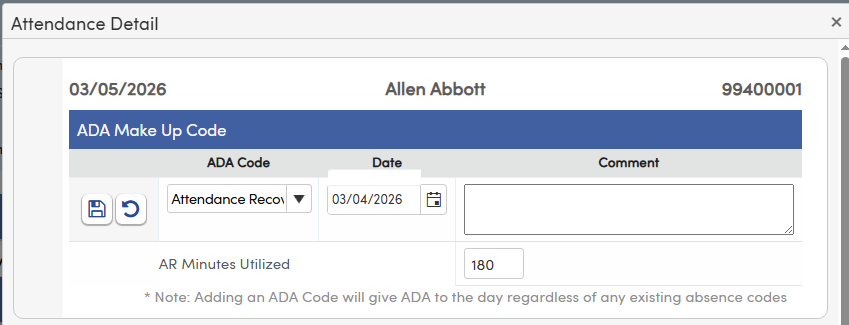
Attendance Recovery does not change the original absence code. Instead, a designated ADA Make-Up Code for Attendance Recovery is applied to the attendance record. When the ADA Make-Up Code is applied, the system automatically populates Minutes Utilized (ATT.AMU) on the attendance record, and minutes utilized are based on the student's minimum instructional day. This creates a clear audit trail showing when and how an absence was recovered.
NOTE: Positive attendance is not yet fully supported for ADA Make-up. We are actively working to bring this functionality to positive attendance schools and will provide updates as progress is made. Users can follow the idea.
Minutes Utilized vs. Hours Earned
Attendance Recovery relies on the balance between Hours Earned (from Supplemental Attendance) and Minutes Utilized (from recovered absences on the Attendance record via ATT.AMU). The system uses these values to track how much recovery time a student has earned, how much has been used, and how much remains available.
AR Minutes Utilized (ATT.AMU)
The ATT.AMU field stores the number of AR minutes utilized for a given attendance record and was introduced specifically to support Attendance Recovery tracking.
Field Behavior
AR Minutes Utilized (ATT.AMU) appears in edit mode when a recovery ADA Make-Up Code is selected on the attendance record. Visibility of ATT.AMU relies on District Settings (DPT.CD = "ADACodesAttdRecovery"). Clearing the ADA Make-Up Code resets ATT.AMU to 0 on save — to clear the field, wipe out the ADA code, Date, and any Comment, then save the record.
Auto-Calculation Logic
When a recovery ADA Make-Up Code is applied, ATT.AMU is automatically populated using the following priority order:
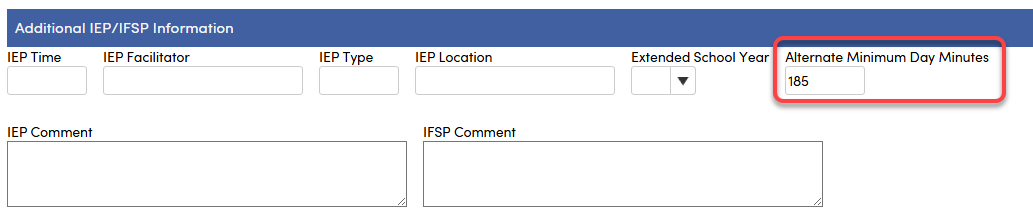
- Special Ed Alternate Minimum Day* — If the absence date falls on an active special education record and the Special Ed Alternate Minimum Day value is populated (CSE.AMD > 0) on the absence date, that value is used first. This field can be found on the Special Education page under the Additional IEP/IFSP Information section. (See image below.)
- School Category — If the student's school is one of the following alternate school types (set in School Options), the corresponding minutes are applied:
- LOC.CT = 15, Continuation School = 180 minutes is applied
- LOC.CT = 19, Opportunity = 180 minutes is applied
- LOC.CT = 16, County Community = 240 minutes is applied
- LOC.CT = 18, Juvenile Court = 240 minutes is applied
- LOC.CT = 17, Community Day School = 360 minutes is applied
- Grade-Based Minimums — if neither of the above applies, then the following minutes are applied: TK/K = 180 minutes, Grades 1–3 = 230 minutes, Grades 4–12 = 240 minutes.
* This only applies to Special Ed students on an IEP that explicitly limits the student's minimum day requirements. That value needs to be populated in the field shown below in the Special Education page. A value can only be entered on an active Special Education record. Once the special education exit date is populated, the field is no longer editable.
Attendance Recovery Bank (ARB) ↑
Aeries maintains an internal Attendance Recovery Bank (ARB) that summarizes Attendance Recovery activity at the student level. The page is available at both the District and School levels. The ARB table does not require direct user entry — it automatically aggregates Attendance Recovery hours earned from Supplemental Attendance sessions, minutes utilized from recovered absences, and remaining recovery time and recoverable absences available.
The ARB uses Student ID as its primary key. A student's AR data is calculated across all schools and will always display the same information, whether accessed from the district or school level.
- District View: Students appear once per school enrollment. If a student is enrolled in multiple schools, they will have a row for each enrollment — but the AR data in every row will be identical.
- School View: Only students enrolled at that school are shown, one row per student. Their AR data will match what is seen at the district level.
NOTE: Inactive schools and DNR schools are not visible in the Attendance Recovery Bank page.
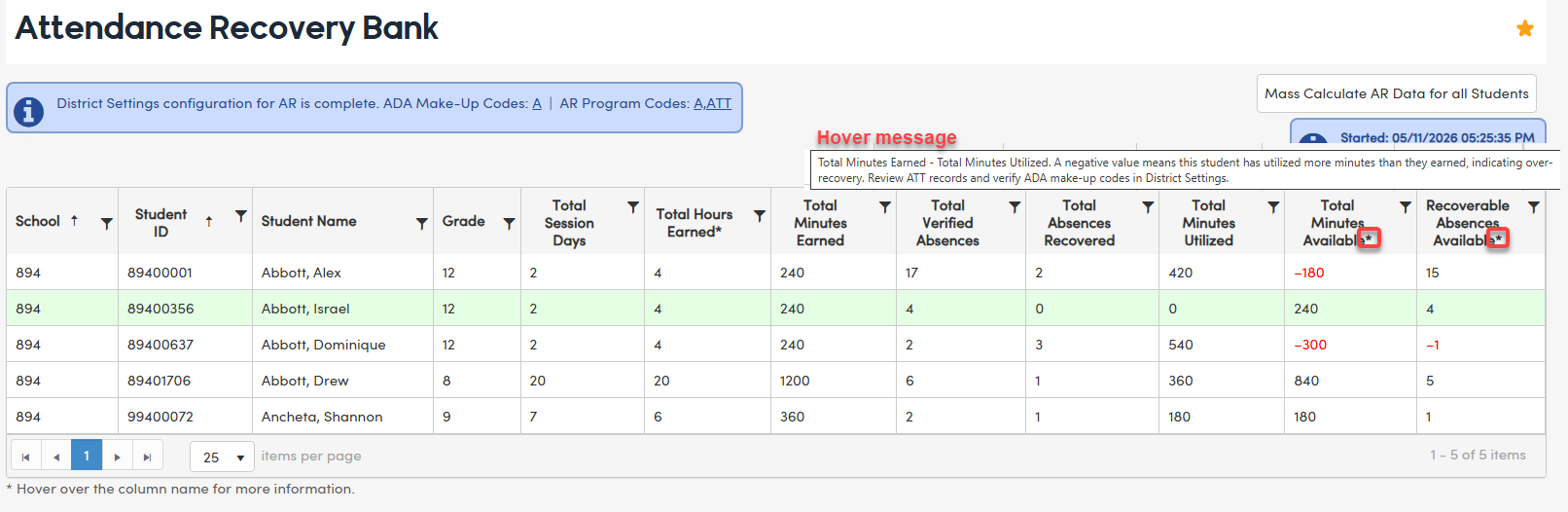
Status messages have been added to the top of the Attendance Recovery Bank page to indicate whether the required District Settings (ADA codes and AR program codes) are configured. If either is missing, a message will identify what is not yet set up. If both are present, the page will display the current settings saved in DPT.

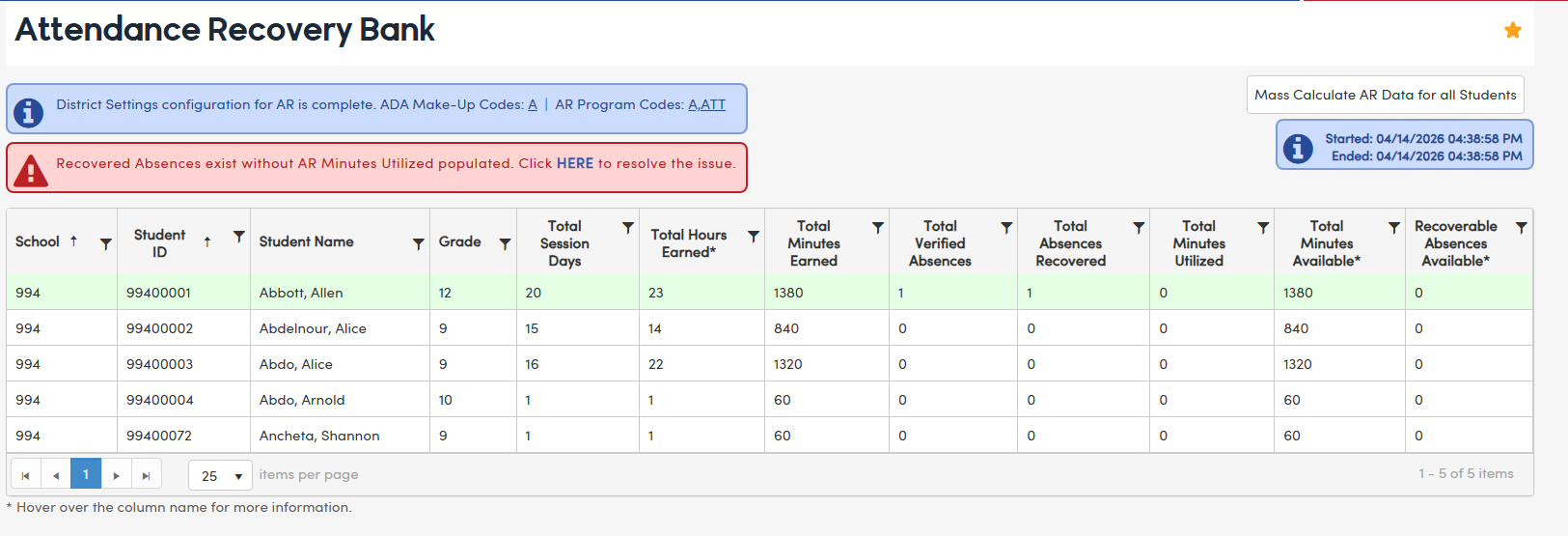
NOTE: Students enrolled in multiple schools will display the same AR data in every row, regardless of which school or enrollment the row represents. This is because the ARB record is tied to the Student ID — not to a specific school enrollment. The data reflects the student's cumulative AR activity across all schools. Inactive schools will not display.
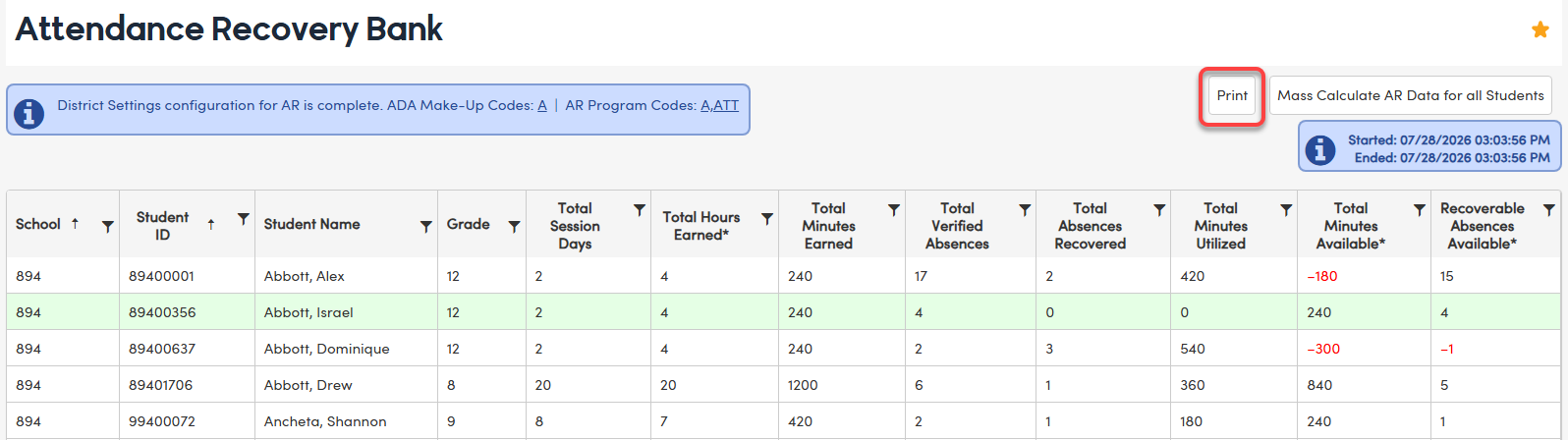
A Print button has been added to the page allowing the information to be printed. The Print button is available at the District or School and will honor any filtered data.
Fields Displayed on the Attendance Recovery Bank (ARB) Page ↑
| Field | Description | Use |
|---|---|---|
| TSD | Total AR Session Days | Unique days student attended an AR session from Supplemental Attendance (ATD), tagged AR per DPT = (ATP.TY), 7/01–06/30 of the current academic year |
| THE | Total AR Hours Earned | Of the filtered session days, total AR hours earned from ATD.ARH |
| TME | Total AR Minutes Earned | Total AR minutes earned; value in ARB.THE × 60 |
| TAB | Total Verified Absences | Unique days student was absent; Total Verified All Day Absences (ATT.AL), ABS.TY = 2 and 3 (excluding suspensions) These are eligible absences to potentially recover via AR. |
| TRV | Total Absences Recovered | Number of AR absences recovered districtwide via ADA Make-Up code (see District Settings) |
| TMU | Total AR Minutes Utilized | Minutes used toward recovery (sum of ATT.AMU) |
| TMA | Total AR Minutes Available | Minutes Earned (ARB.TME) minus Minutes Utilized (ARB.TMU) |
| TAA | Total Recoverable Absences Available | Total Verified Absences (ARB.TAB) minus Total Absences Recovered (ARB.TRV) |
Mass Calculation Button ↑
A Mass Calculate AR Data for All Students button is available on the Attendance Recovery Bank page to trigger recalculation of AR data for all students with ATD records. This button is only available at the District level to ensure that all students are recalculated districtwide and student information is always in sync.
Access & Permissions: The button is available at the district level only. Only users with Admin or Mass Update (Administer) permission to the Attendance Recovery Bank can use it.
What the ARB Page Calculates
When a mass calculation is triggered, the ARB page performs the following operations in order:
- Checks whether ATT.ADA contains a qualifying AR code and ATT.AMU is zero, then calculates and populates ATT.AMU with the appropriate AR minutes utilized.
- Updates ATD.ARH prior to the ARB table calculation.
- Physically deletes existing ARB records for the applicable scope, then repopulates the ARB table with recalculated data.
Processing Scope:
- District level — the entire ARB table is cleared and all students across all schools are recalculated.
NOTE: This applies even in cases where a student has moved between schools.
ATT.AMU Discrepancy Update: If ATT.AMU discrepancies are detected — meaning ATT.ADA contains a qualifying AR code but ATT.AMU is zero — authorized users can trigger an update directly from the ARB page by selecting the HERE link. A confirmation popup is required before the process runs. This action is restricted to users with Mass Update permission to the Attendance Recovery Bank.
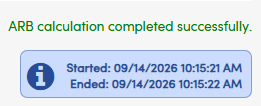
Button Behavior: Once the action is confirmed, the button temporarily disappears to prevent duplicate submissions, and a brief message appears confirming that the process is running. An info box on the page shows the Start and End timestamps of the most recent mass update, so users can see when the ARB table was last refreshed. These timestamps appear at both the school and district levels. Note that the Mass Calculation can only be run from the District level.
NOTE: Start and End timestamps are stored in the system and updated each time the process completes.
Negative TMA and TAA Values ↑
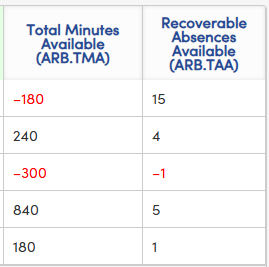
If the Total Minutes Available (TMA) or Recoverable Absences Available (TAA) column displays a negative value (shown in red), the student has recovered more absences than they were eligible to recover. This condition — known as over-recovery — will result in fatal errors in CALPADS and must be corrected before submission. To resolve, review the student's ATT records to verify attendance entries are accurate, and confirm that the ADA make-up codes configured in District Settings are appropriate. Adjustments should be made to ensure the student's recovered absences do not exceed what was legitimately available.
Hovering over the TMA or TAA column header will display a tooltip explaining that a negative value indicates the student has utilized more minutes than they earned, and directs administrators to review ATT records and verify ADA make-up codes in District Settings.
Reporting and Downstream Impacts ↑
Attendance Reporting
Absences recovered using an AR ADA Make-Up Code are automatically included in Apportionment Days on Monthly Attendance Summary reports. The Monthly Attendance Summary Report includes an asterisk next to Column H indicating it has been reduced by the number of days with an ADA Make-Up code. Recovered absences are summarized by school and grade span for state reporting.
State Reporting
Attendance Recovery days are reported to CALPADS on a student by student basis through the STAS extract file. The AR Days will be calculated based on the ATT.ADA Make-up days that are defined as Attendance Recovery. These codes must be defined in the District Settings. Exempted students must be identified in CALPADS-Other Options and will appear in the extract with a blank in AR Days column.
Key Takeaways ↑
- Attendance Recovery is supported through Supplemental Attendance, not by altering original absences.
- Recovery hours are earned through Supplemental Attendance sessions and stored at the student session level.
- Absences are recovered by applying an ADA Make‑Up Code, which automatically populates ATT.AMU (AR Minutes Utilized).
- ATT.AMU is auto-calculated based on the student’s instructional day, with a defined priority order (Special Ed AMD → Alternate school category type → grade-based minimums).
- The Attendance Recovery Bank (ARB) page (California only) provides a read-only summary of each student’s AR activity.
- The Mass Calculate AR Data for all Students button on the ARB page allows authorized users to trigger recalculation; timestamps track the last run start and end times.
- This design improves auditability, reporting accuracy, and regulatory compliance.
- Once basic functionality is fully covered, enhancements will be made to the process to allow greater visibility and attendance recovery management on a student by student basis.
Resources ↑
AR WorkFlow: https://support.aeries.com/support/solutions/articles/14000163826-workflow-attendance-recovery-ar-
How will AR be used: https://support.aeries.com/en/support/solutions/articles/14000159163-how-will-attendance-recovery-be-used-in-aeries
ADA Make-Up: https://support.aeries.com/support/solutions/articles/14000088722-attendance-note-ada-make-up
District Settings: https://support.aeries.com/support/solutions/articles/14000076634-district-settings-district-rules-
Importing Supplemental Attendance Data: https://support.aeries.com/support/solutions/articles/14000160275-can-supplemental-attendance-data-atd-be-imported-into-aeries-from-an-excel-spreadsheet-
CALPADS-Other Options tab - https://support.aeries.com/support/solutions/articles/14000067781-calpads-extracts-other-options-tab
School Options: School Options Setup