

Establish Student Program Eligibility (PGM-194)
Recording ELOP Sessions: Import Options
About the PGM.TED Field (Total ELOP Days)
Creating New PGM-194 records that don't already exist in Aeries
Calculating PGM.TED from ATD Records
Quick Reference: Choosing Your Import Option
Overview
The Extended Learning Opportunity Program (ELOP) requires districts to track student participation and report total days of participation to the state via CALPADS. This article explains how districts can record and report ELOP participation in Aeries — whether sessions are tracked natively in Aeries or managed in a third-party system and imported using the Import Data to Aeries form.
There are three pathways available:
- Option 1: Track ELOP sessions entirely within Aeries Supplemental Attendance without importing external data. Aeries will create LEAP Programs and calculate ELOP Days automatically.
- Option 2: Import directly into the ATD (Supplemental Attendance) table to record individual student session days. Aeries will create LEAP Programs and calculate ELOP Days automatically.
- Option 3: Import Program 194 records directly into the PGM (Special Programs) table and include the Total ELOP Days field (PGM.TED).
NOTE: Total ELOP Days (PGM.TED) can be calculated from ATD records using the Update ELOP Days Participated for All Students button on the CALPADS Extract > EOY - LEAP Extract page, but only if ELOP session records exist in ATD. Districts importing totals directly into PGM.TED (Option 3) do not use this button. See the State Reporting section for details.
District Setup Tasks ↑
Before importing ELOP data, complete the following setup steps in Aeries.
Configure Supplemental Attendance Type Codes
If your district will use Aeries Supplemental Attendance to track ELOP sessions (Option 1 or Option 2), you must identify Attendance Type Codes in the DPT table that are designated exclusively for ELOP use. The codes must be setup in the code table prior to seeing these codes in the District Settings. Open the Update Code table, select the ATP table and TY field. Enter any codes that will be used in the Supplemental Attendance, specifically ELOP.
- Navigate to Update Code table > ATP > TY. Enter any codes that will be used in Supplemental Attendance, specifically ELOP.
- Navigate to District Settings > Supplemental Attendance Types (DPT).
- Identify codes to be used only for ELOP sessions.
- Document these codes — they will be required when configuring the import mapping and the LEAP Extract.
NOTE: Using dedicated ELOP-only type codes ensures that session data can be accurately filtered when calculating PGM.TED from ATD records and when generating the LEAP Extract.
Establish Student Program Eligibility (PGM-194) ↑
Each student who has parental consent to participate in ELOP must have a PGM record with Program Code 194 created in Aeries. This record tracks program eligibility and stores the Total ELOP Days value (PGM.TED) for state reporting.
- PGM-194 records should be created at the district level (School Code = 0) so they are accessible across schools.
- Records should be created when parent/guardian consent is received.
- The PGM.TED field (total ELOP Days) is only available on PGM records where the Program Code is 194.
Recording ELOP Sessions: Import Options ↑
Districts have three options for recording ELOP sessions completed by students. If your district manages session data in a third-party system, Options 2 and 3 are most relevant.
Option 1 — Supplemental Attendance (Aeries-Managed)
Districts that use Aeries Supplemental Attendance as their primary ELOP tracking tool can record sessions directly in Aeries without importing external data. This option tracks unique days of participation, including sessions as short as 5 minutes.
- This option does not require data import from a third-party system.
- See District Settings and the Supplemental Attendance documentation for configuration steps.
- Total ELOP Days (PGM.TED) can be populated from CALPADS Extracts > EOY - LEAP Extract page using the Update ELOP Days Participated for All Students button, since sessions are recorded directly in ATD. See State Reporting.
Option 2 — Import Supplemental Attendance Data
NOTE: This process does not prevent duplicates. If the same data is uploaded more than once, duplicate records will be created. It is always recommended that this process is run in a Sandbox environment first to ensure that the import works as expected. Do not import the same student, same session and same dates, same times more than once or you will have duplicate records.
If your district records ELOP sessions in a third-party system, you can import that data directly into the ATD (Supplemental Attendance Data) table in Aeries. This approach records individual student session days in Aeries and allows PGM.TED to be calculated from those imported records.
Preparing Your Import File
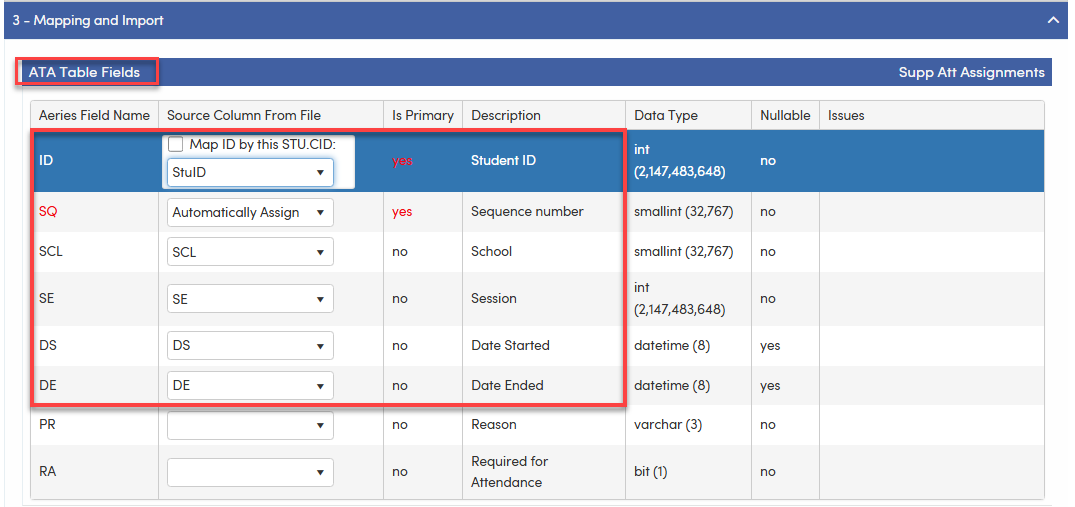
Students must first exist in the ATA table before importing data into ATD.
This can be done either manually or via an import file. Ensure the School and Session number matches to the data in the ATD import file.
ATA data fields needed for import: All fields contained in the red box need to be included in the import file and mapped accordingly.
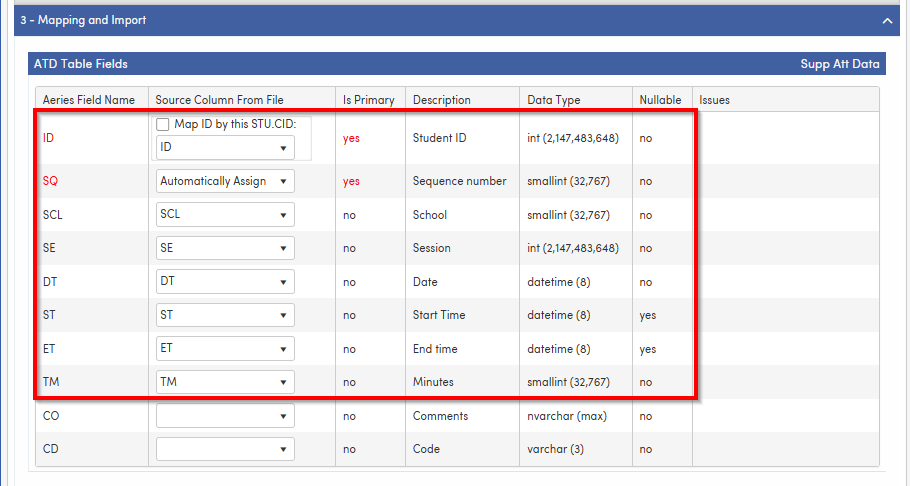
Your import file must be formatted to match the ATD table structure. All fields contained in the red box need to be included in the import file and mapped accordingly. Minutes must be imported as this is not calculated for records directly imported into the table.
Running the Import
- Navigate to School > Import Data to Aeries.
- Select ATD – Supplemental Attendance Data as the target table (or ATA-Supplemental Attendance Assignments if importing Student's Attendance Assignment record.)
- Upload your prepared import file (CSV or tab-delimited format).
- Map your source file columns to the ATD (or ATA) table fields.
- Review the field mapping and validate for errors.
- Run the import. Review the results summary for any records that failed to import.
Option 3 - Bypass Supplemental Attendance and Import Program 194 and Total ELOP Days Directly into Special Programs
NOTE: This process does not prevent duplicates. If the same data is uploaded more than once, duplicate records will be created. Establish a procedure to import records only once and not repeatedly for the same student records.
If your third-party system calculates the total number of unique ELOP session days for each student, you can import that data directly into the Special Programs table and include the Total ELOP Days on the student’s PGM-194 record. This bypasses ATD session-level data entirely; however, PGM data must still be added and managed in Aeries.
Use this option when:
- Your third-party system already calculates and maintains a total unique session day count per student.
- You do not need individual session-level data in Aeries.
NOTE: A program 194 record must be added to the PGM table along with the Total ELOP Days. The Import Data to Aeries form can be used to import this information. The Update ELOP Days Participated for All Students button will not function for this option since no ATD records exist for ELOP.
Preparing Your File ↑
Your import file must be formatted to match the PGM table structure. The following fields are necessary:
Field | PGM Column | Description |
Student ID | PGM.PID | Student ID number (must match existing Aeries student record) |
Program Code | PGM.CD | Must be 194 for ELOP records. Reported to CALPADS |
School Code | PGM.SC | Should be 0 for district-level records |
| Eligibility Start Date | PGM.ESD | Can be the first day of school. Values are not reported to CALPADS |
| Eligibility End Date | PGM.EED | Can be the last day of school. Values are not reported to CALPADS |
| Participation Start Date | PGM.PSD | Actual Participation Start Date. Values are not reported to CALPADS. |
| Participation End Date | PGM.PED | Actual Participation End Date. Values are not reported to CALPADS |
| Total ELOP Days | PGM.TED | Total number of unique ELOP session days (numeric). Will extract from this field. Can be 0. Reported to CALPADS |
Running the PGM Import
- Navigate to School > Import Data to Aeries.
- Select PGM – Special Programs as the target table.
- Upload your prepared import file.
- Map your source columns to the PGM table fields, including PGM.TED.
- Ensure the import is configured to update existing records (not insert new duplicates) to avoid creating duplicate PGM entries.
- Validate the mapping and review any errors before running.
- Run the import and review the results summary.
About the PGM.TED Field (Total ELOP Days) ↑
PGM.TED is a new field added to the PGM (Special Programs) table that stores the total number of unique ELOP participation days for a student. It is only visible and editable on PGM records where the Program Code (PGM.CD) is 194.
PGM.TED can be populated in three ways:
- Calculated using the Update ELOP Days Participated for All Students button on the CALPADS Extracts page under EOY > LEAP Extract — only available if ATD session records exist for ELOP (Options 1 or 2).
- Imported directly from a third-party system using the PGM import (Option 3 above).
- Entered or updated manually on the student’s PGM-194 record in Aeries.
NOTE: Option 1 and Option 2 districts: Running the Update ELOP Days Participated for All Students button will overwrite any manually entered or previously imported PGM.TED values each time it is run.
NOTE: Option 3 districts: The Update ELOP Days Participated for All Students button will not produce results if your district imported PGM.TED directly, as no ATD session records are created in that workflow. Do not use this button.
Special Programs Code 194 ↑
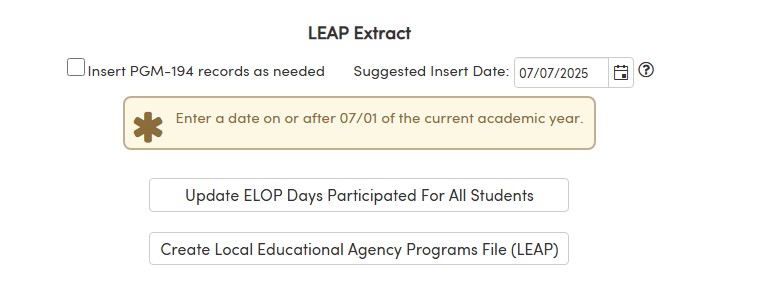
For districts who manage ELOP data in Aeries using Supplemental Attendance, the CALPADS Extracts page provides an option to automatically create Program 194 records. The option, Insert PGM-194 Records as Needed, must be selected in order for PGM records to be created. A Suggested Insert Date field will display with the first day of the District calendar but can be modified if necessary. This date populates the Eligibility Start Date in Special Programs for all new Program 194 records added during the process. A tooltip is available and when selected will display a message to enter a date on or after 07/01 of the current academic year.
The process runs for students in all schools regardless of the school selection on the Schools tab and regardless of the school the user is logged into. This is intentional to ensure that all ELOP program records are identified properly districtwide.
Creating New PGM-194 records that don't already exist in Aeries ↑
NOTE: Aeries will create Program 194 records automatically if Supplemental Attendance records exist for ELP.
- Select the option Insert PGM-194 Records as Needed.
- Enter the first day of student enrollment according to the District calendar, or leave the Suggested Insert Date as-is.
- Click the Update ELOP Days Participated for All Students button. A record will only be created if one does not already exist.
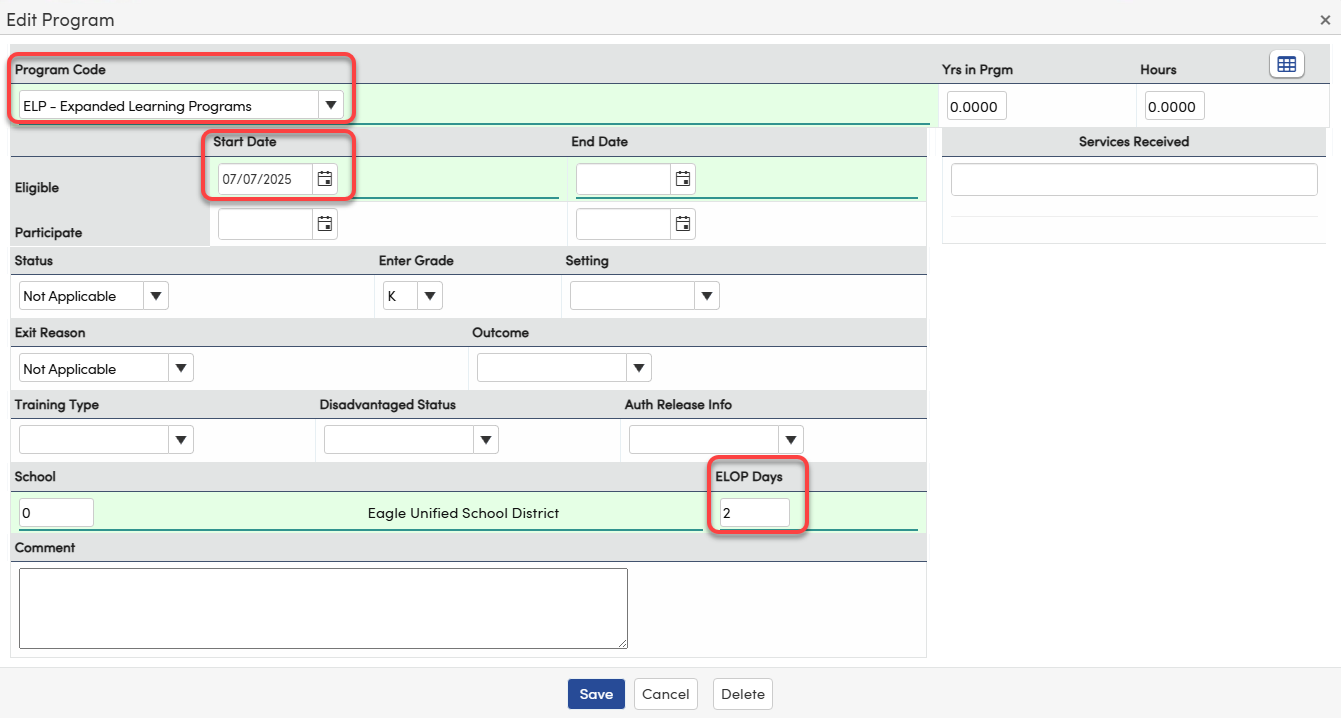
The following fields will be populated for the newly created records:
- Program Code = PGM.CD 194 - ELP Expanded Learning Programs
- Eligibility Start Date (PGM.ESD) will populate with the Suggested Insert Date. Date can be manually overwritten.
- ELOP Days = The total number of unique Expanded Learning Program session days, calculated from Supplemental Attendance records. Note: The attendance type code (ATP.TY) must be configured as an ELP program in District Settings. See District Settings for configuration.
Existing PGM-194 Records ↑
If a PGM-194 record already exists, the ELOP Days field will only be populated if the student has Supplemental Attendance (ATD) records designated as ELP. Records without qualifying ATD data will be skipped.
When the Update ELOP Days Participated for All Students button is clicked, the system evaluates Supplemental Attendance (ATD) records for students who have participated in an ELP program during the current academic year. If qualifying records are found, the ELOP Days field will update with the total number of unique days to be reported in Special Programs > ELOP Days on the PGM-194 record.
NOTE: Districts that do not use Supplemental Attendance (ATD) to track ELOP sessions — such as those using Option 3 — do not need to use the Insert PGM-194 Records as Needed option or the Update ELOP Days Participated for All Students button. Both are unchecked/inactive by default. ELOP Days (PGM.TED) must be populated manually or via direct import for accurate CALPADS reporting.
Completion Email ↑
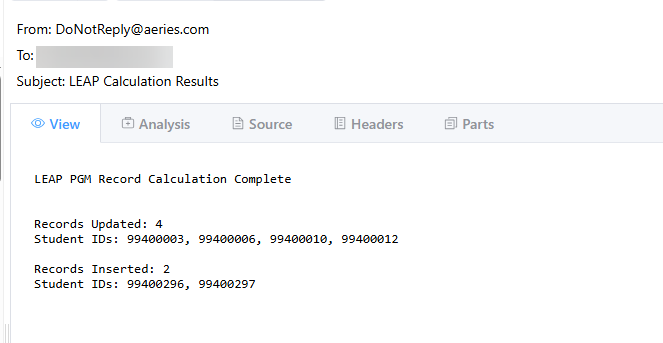
When the Insert PGM-194 Records as Needed option is selected and the Update ELOP Days Participated for All Students button is clicked, a confirmation email will be sent to the user upon completion if program records were inserted or updated. If no records were inserted or updated during the process, no email will be sent.
Calculating PGM.TED from ATD Records ↑
For districts using Option 1 or Option 2, follow these steps to calculate and populate PGM.TED from ATD records before generating the LEAP Extract.
- Navigate to CALPADS Extracts > EOY > LEAP Extract.
- Click the Update ELOP Days Participated for All Students button.
- Aeries will count the unique session days in ATD for each student using ELOP-designated attendance type codes from the DPT table. (See District Settings for configuration).
- The resulting count will be written to PGM.TED on each student’s PGM-194 record.
- Review PGM.TED values before generating the final LEAP extract.
State Reporting: LEAP Extract ↑
ELOP participation data is submitted to CALPADS as part of the EOY (End of Year) submission using the LEAP Extract.
All PGM-194 records are included in the extract, even if a student has zero participation days. The extract reports total days of participation per student using the value stored in PGM.TED. Students with a PGM-194 record but no session data recorded will report 0 days.
Generating the LEAP Extract ↑
- Navigate to CALPADS Extracts > EOY - LEAP Extract.
- On the Schools tab, ensure all schools are selected that get reported to CALPADS.
- Ensure PGM.TED has been populated for all eligible students (either via import or by running Update ELOP Days Participated for All Students button.
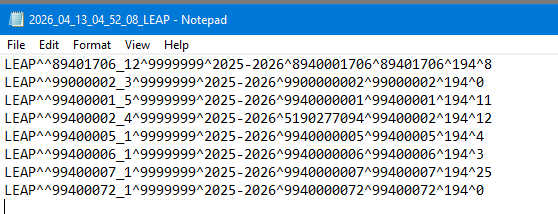
- Click the Create Local Educational Agency Programs File (LEAP) button.
- Download the extract file for CALPADS EOY submission.
Example:
Quick Reference: Choosing Your Import Option ↑
Scenario | Recommended Option | PGM.TED Source |
District tracks ELOP sessions entirely in Aeries | Option 1 – Supplemental Attendance | Update ELOP Days Participated for All Students button |
Third-party system exports individual session records | Option 2 – Import into ATD | Update ELOP Days Participated for All Students button |
Third-party system exports a total day count per student | Option 3 – Import into PGM table | Imported directly into PGM.TED Import the PGM.CD, PGM.ESD and PGM.TED fields |
Related Articles ↑
- Import Data to Aeries – Overview
- Supplemental Attendance Setup and Configuration
- District Settings – Supplemental Attendance Type Codes
- Special Programs – Managing Student Records
- CALPADS LEA Programs – LEAP Extract
- Can Supplemental Attendance Data be Imported into ATD
NOTE: Duplicate Record Risk: None of the import options described in this guide include built-in duplicate prevention. Uploading the same file more than once will create duplicate records, which can result in inflated ELOP day counts and incorrect CALPADS reporting. To prevent duplicates: always test imports in a Sandbox environment first; keep a log of completed imports; and use the update (not insert) mode when importing PGM records for students who already have PGM-194 records in Aeries. If duplicates are discovered after import, they must be manually removed before generating the LEAP Extract. Duplicate students in the LEAP extract will result in CALPADS fatal errors. Aeries will only extract the more recent record when two are in the PGM table.