

Navigate to School Info > Imports and Exports > Import Test Results
The Import Test Results process will add any new ELPAC test parts into the Testing Control (CTL) table when the ELPAC data is uploaded into Aeries.
NOTE: The data file must be in the format defined in the ELPAC Student Data File Layout found on the ELPAC Test Administration Score Reporting website. Only the LEA ELPAC Coordinator has the necessary permissions in the TOMS site to download the Student Score Data Extract. Please note that the score reports available from the Online Reporting system are not in the correct format, the correct file (Summative Student Score Data Extract) can only be downloaded by the LEA ELPAC Coordinator from within TOMS. For more information on finding the correct ELPAC Student Score data file please see the Downloading ELPAC and IELPAC scores from TOMS article.
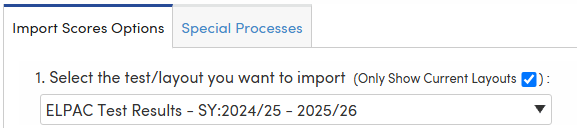
Select the ELPAC Test Results - SY:2024/25 - 2025/26 file layout to import the ELPAC student results. This one layout imports both the 2024-25 and 2025-26 Summative ELPAC and Summative Alternate ELPAC files. Older ELPAC layouts appear only after you clear the Only Show Current Layouts check box.
Districts will download a .zip file that contains both a text (.dat) file and a caret-delimited (.csv) file from the testing vendor. The Import Test Results page has been programmed to import the caret-delimited (.csv) file. Keep the header row in the file and do not change the column names.
Select the layout first, then click Select File(s) to Load, select the .csv file, and click Open. Click Upload file(s) and create temp data. Then continue to match the records.

The Default Date is the earliest Final Test Completed Date in the file and is used only for a record that has no Final Test Completed Date. The Testing Administration for each record is MMYY of that record’s Final Test Completed Date and is saved in the student’s TST record. NOTE: The Default Date and Testing Administration boxes are read-only and cannot be changed on this page.

Click Match Students. In the Match Options window, State ID is the primary identification in the ELPAC Student Results data files and should be the first method used for matching students. Click Start Match.

Click on the Print Unmatched Students button to print a report listing any students that were not able to be matched.

The Edit button to the left of the test record can be used to manually match test records to students that may not have been matched during the match process or that may have been matched to an incorrect student. Please see the Import Test Results article for detailed instruction on how to do this.

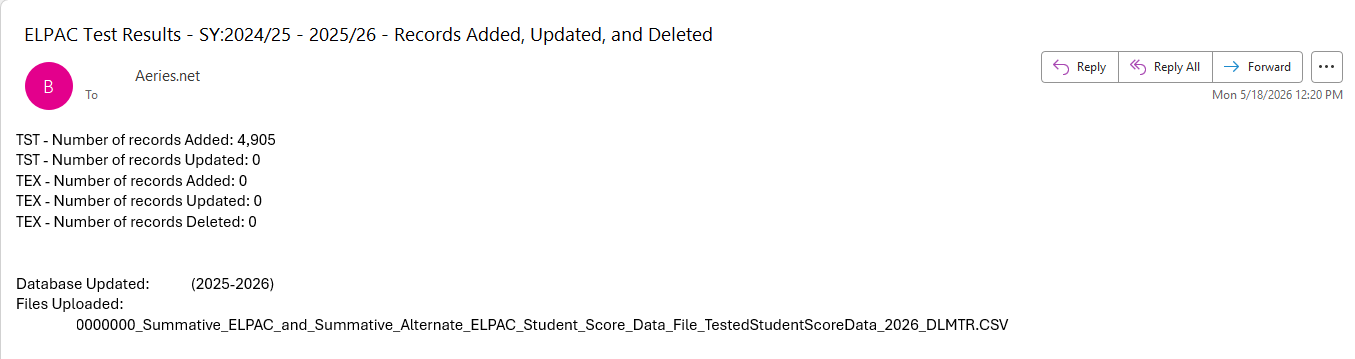
After matching, click Update Test Tables. The ELPAC Test Results import adds and updates records in the Test Scores (TST) and Testing Exclusions (TEX) tables, and removes a Testing Exclusions record when the file no longer shows the domain as exempt. After the import process has completed an email with summary information will be sent to the user that initiated the import.
Below is a chart of where the significant fields in the ELPAC data file are stored in the Test Scores (TST) and Testing Exclusions (TEX) tables:
For the Summative ELPAC test TST.ID = ELPAC
For the Alternate ELPAC test TST.ID = AELPAC. The Alternate ELPAC creates only the Overall test score record (TST.PT = 0).
| Field # | Length | Field Name | Aeries Table | Notes |
|---|---|---|---|---|
| 1 | 2 | RecordType | TST.ID | Used to determine if the data is for the ELPAC or Alternate ELPAC 21 = ELPAC 23 = Alt ELPAC |
| 5 | 10 | SSID | May be used during matching process | |
| 6 | 15 | LocalStudentID | TST.PID | May be used during matching process |
| 8 | 50 | StudentLastName | May be used during matching process | |
| 9 | 30 | StudentFirstName | May be used during matching process | |
| 13 | 10 | DateofBirth | May be used during matching process | |
| 17 | 2 | GradeAssessed | TST.GR | |
| 70 | 10 | TestCompletedDate1 | TST.TD, TST.DT | Test date for Listening record (TST.PT = 3) |
| 79 | 10 | TestCompletedDate2 ** | TST.TD, TST.DT | Test date for Speaking record (TST.PT = 4) |
| 88 | 10 | TestCompletedDate3 ** | TST.TD, TST.DT | Test date for Reading record (TST.PT = 5) |
| 97 | 10 | TestCompletedDate4 ** | TST.TD, TST.DT | Test date for Writing record (TST.PT = 6) |
| 105 | 10 | FinalTestCompletedDate | TST.TD, TST.DT, TST.TA | Test date for Overall, Oral and Written records (TST.PT = 0, TST.PT = 1, TST.PT = 2) Also, the Testing Administration (TST.TA) for all test parts is derived from this date. |
| 136 | 2 | RawScore1 ** | TST.RS | For Listening (TST.PT = 3) |
| 137 | 2 | RawScore2 ** | TST.RS | For Speaking (TST.PT = 4) |
| 138 | 2 | RawScore3 ** | TST.RS | For Reading (TST.PT = 5) |
| 139 | 2 | RawScore4 ** | TST.RS | For Writing (TST.PT = 6) |
| 140 | 4 | OverallScaleScore | TST.SS | For Overall (TST.PT = 0) |
| 141 | 4 | OralLanguageScaleScore ** | TST.SS | For Oral Language (TST.PT = 1) |
| 142 | 4 | WrittenLanguageScaleScore ** | TST.SS | For Written Language (TST.PT = 2) |
| 143 | 2 | OverallPL | TST.PL | For Overall (TST.PT = 0) |
| 144 | 2 | OralLanguagePL ** | TST.PL | For Oral Language (TST.PT = 1) |
| 145 | 2 | WrittenLanguagePL ** | TST.PL | For Written Language (TST.PT = 2) |
| 149 | 2 | ListeningPL ** | TST.PL | For Listening (TST.PT = 3) |
| 150 | 2 | SpeakingPL ** | TST.PL | For Speaking (TST.PT = 4) |
| 151 | 2 | ReadingPL ** | TST.PL | For Reading (TST.PT = 5) |
| 152 | 2 | WritingPL** | TST.PL | For Writing (TST.PT = 6) |
| 153 | 1 | DomainEx1 ** | TEX.ERS | For Listening (TEX.PT = 3) |
| 154 | 1 | DomainEx2 ** | TEX.ERS | For Speaking (TEX.PT = 4) |
| 155 | 1 | DomainEx3 ** | TEX.ERS | For Reading (TEX.PT = 5) |
| 156 | 1 | DomainEx4 ** | TEX.ERS | For Writing (TEX.PT = 6) |
** = Data provided for only the Summative ELPAC