

What puts a teacher into the SDEM file
Reporting a teacher who is no longer active
Staff Assignment (SASS) fields
What puts an assignment into the SASS file
Teachers at more than one school or with more than one job
Overview
Navigate to School Info > Staff.
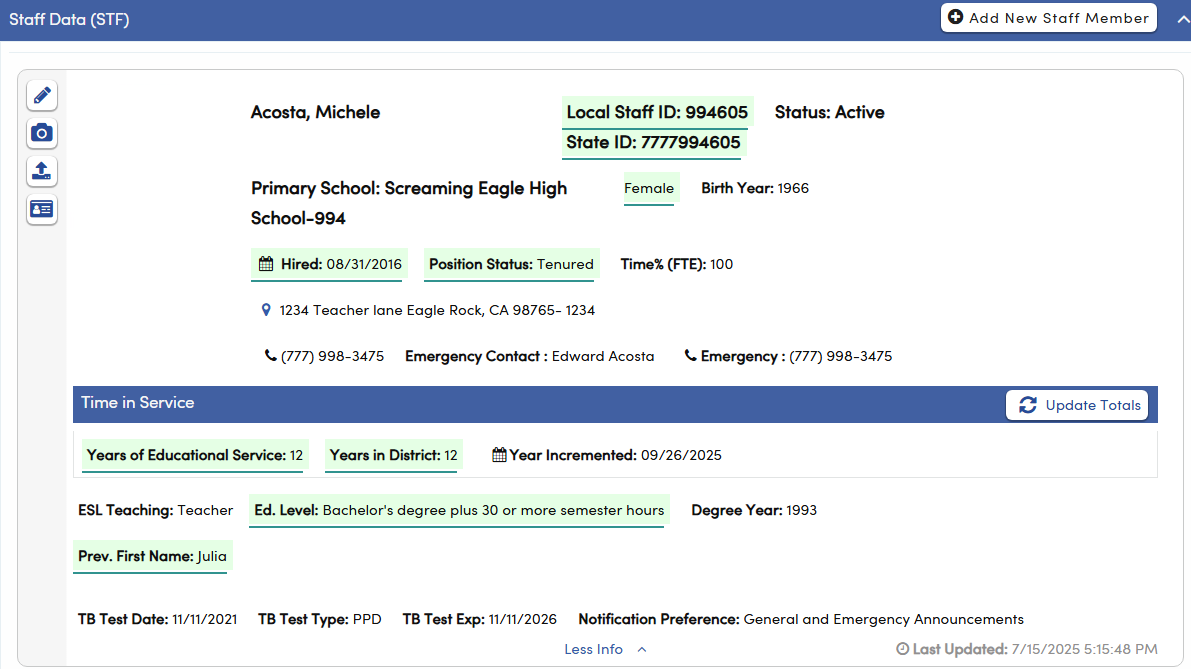
CALPADS tracks every certificated staff member with two records. The Staff Demographics (SDEM) record says who the staff member is and when they were employed. The Staff Assignment (SASS) record says what the staff member does, at which school, as which job classification, and at what FTE. The Aeries CALPADS Fall 2 extract builds both from the Staff table (STF) and the Job Assignments table (STJ), and a staff member only gets SASS records if they are in SDEM. This article explains how to set up staff in Aeries so that teachers are pulled into SDEM and SASS, and how to report a teacher who is no longer active. To report a teacher who has left, enter the Leave Date on the staff record, and keep the Hire Date, State Educator ID, Position Status, and primary school. When you run the Fall 2 extract, Aeries sends the Leave Date as the Employment End Date, which closes the teacher's employment in CALPADS.

Security ↑
| Table | Permission | Description |
|---|---|---|
| Staff (STF) | Read, Insert, Update, Delete | View page, Add new record, Update records, Delete records |
| Job Assignments (STJ) | Read, Insert, Update, Delete | View job assignments, Add new assignment, Update assignments, Delete assignments |
| CALPADS translations (XRF) | Insert | Add new translation codes |
Configurations ↑
CALPADS translations (XRF)
Several Staff fields are translated to CALPADS codes through the CALPADS translation (XRF) table before they are written to the extract. Aeries fixed codes are translated automatically. If your district uses a local code in one of these fields, add a translation row for it.
| Aeries field | XRF Table and Field | Translates to | What you need to do |
|---|---|---|---|
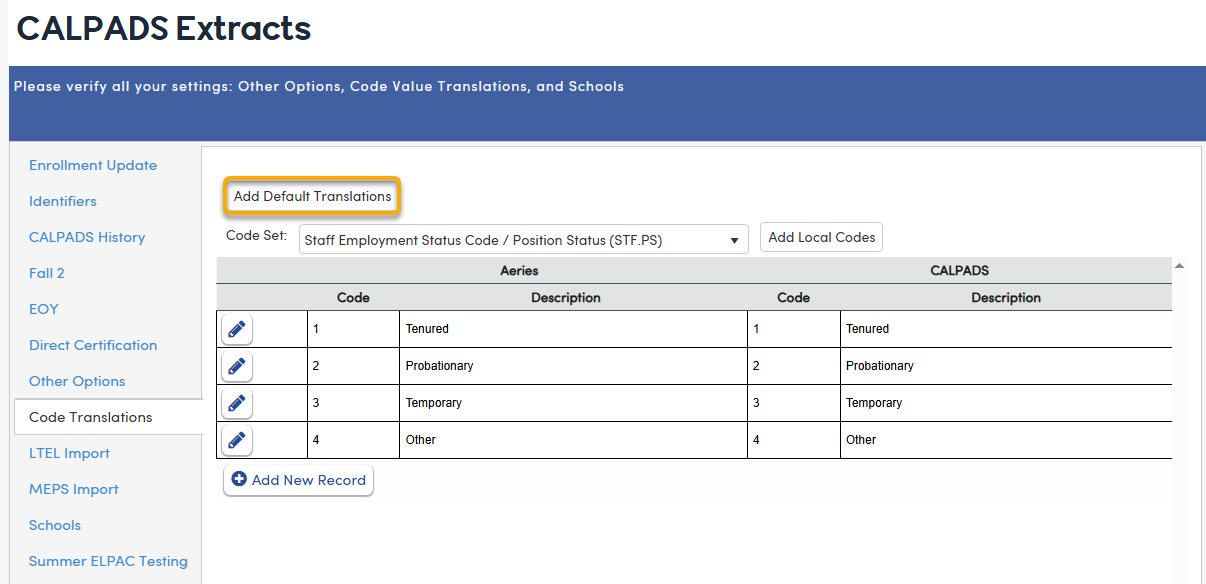
STF.PS (Position Status) | STF, PS | Employment Status Category (SDEM 7.27), code 1 to 4 | Fixed codes translate automatically. Add a row only for a local Position Status value you added, mapped to code 1, 2, 3, or 4. |
STF.EL (Educational Level) | STF, EL | Highest Degree (SDEM 7.26) | Fixed codes translate automatically. Add a row for each local code you added. |
STF.GN (Gender) | STF, GN | Gender (SDEM 7.17) | Fixed codes translate automatically. Add a row for each local code you added. |
STF.RC1 through RC5 (Race1 through Race5) | STU, RC1 | Race codes (SDEM 7.20 to 7.24) | Fixed codes translate automatically. Add a row for each local code you added. |
STJ.JC (Job Classification) | STJ, JC | CALPADS Job Classification | Fixed codes translate automatically. A local code must have a row, or the teacher is not reported (unless the teacher left before the Fall census date). |
To add or change translations, use the CALPADS translation (XRF) table. Click Add Default Translations on the CALPADS Extracts > Code Translations page to add Aeries' default rows. Add Default Translations only adds missing rows and does not change local codes. Use Add Local Codes button to add local codes from the COD table.
Position Status ↑
The CALPADS Employment Status Category describes a teacher's tenure. It does not say whether the teacher is still employed. The Leave Date does that. CALPADS accepts four values:
| CALPADS code | Meaning |
|---|---|
| 1 | Tenured |
| 2 | Probationary |
| 3 | Temporary |
| 4 | Other (for example, contracted teachers from another agency or district) |
CALPADS applies this field to teachers only. Starting 7/1/2026, the teacher job classifications are 13 (Teacher, Instructional Assignments) and 14 (Teacher, Non Instructional Assignments). Codes 12, 26, and 27 ended 6/30/2026. Aeries still requires a Position Status on every staff record it reports. Position Status uses Aeries fixed codes, which are translated automatically. If your district added a local Position Status value, map it to code 1, 2, 3, or 4 in the XRF table.
Extract Options ↑
| Option | What it does |
|---|---|
| Schools selected | The teacher's primary school (STF.PSC) must be one of the schools selected when you run the extract. District level staff (school 0) are always included. |
| Fall 2 Info day | By default this is the first Wednesday in October, which is October 7, 2026 for the 2026 to 2027 school year. Your LEA can change it when a non school day falls on census day. Staff must have a Hire Date on or before this date. Staff who left before this date are written to SDEM only, with no Staff Assignment (SASS) record. The job assignment dates are also checked against this date. |
| Blank Race Code | The local Race 1 value that means race is not reported. When Race 1 equals this value, Race Missing is set to Y and no race codes are sent. |
| Missing Ethnicity and Race indicator | The value written to Ethnicity Missing and Race Missing when a staff member has no data. |
| Pull CDS from School LOC | For charter districts. Uses the school on the teacher's job assignment (STJ.SCL), when one is entered, instead of the primary school to find the reporting LEA. |
Tables ↑
| Table | Field | Description |
|---|---|---|
| Staff (STF) | SID (State Educator ID) | SDEM 7.08 SEID. Must be a valid SEID. |
| Staff (STF) | ID | SDEM 7.09 Local Staff ID. |
| Staff (STF) | LFN, LMN, LLN | SDEM 7.10 to 7.12 Legal Name. Used when entered. Otherwise FN, MN, and LN are used. |
| Staff (STF) | FNP, MNP, LNP | SDEM 7.13 to 7.15 Alias Name (prior name fields). |
| Staff (STF) | BD (Birthdate) | SDEM 7.16 Birth Date. Staff must be at least 18 and under 95. |
| Staff (STF) | GN (Gender) | SDEM 7.17 Gender. Translated through XRF. |
| Staff (STF) | ETH (Ethnicity) | SDEM 7.18 and 7.19 Hispanic Ethnicity and Ethnicity Missing. |
| Staff (STF) | RC1 through RC5 | SDEM 7.20 to 7.24 Race 1 through 5. If Race 1 is blank, Race Missing is set to Y and no race codes are sent. |
| Staff (STF) | EL (Educational Level) | SDEM 7.26 Highest Degree. Translated through XRF. |
| Staff (STF) | PS (Position Status) | SDEM 7.27 Employment Status Category. Translated to code 1 to 4 (fixed codes automatically, local codes through XRF). |
| Staff (STF) | HD (Hire Date) | SDEM 7.28 Employment Start Date. Also drives the Effective Start Date. |
| Staff (STF) | LD (Leave Date) | SDEM 7.29 Employment End Date. Blank when there is no Leave Date. Also drives the Effective Start Date. |
| Staff (STF) | TYD (Total Year in This District) | SDEM 7.30 Service Years LEA. Blank is sent as 0, which CALPADS rejects. Enter 1 or more. |
| Staff (STF) | TYS (Total Years of Educational Service) | SDEM 7.31 Service Years Total. Blank is sent as 0, which CALPADS rejects. Enter 1 or more. |
| Staff (STF) | PSC (Primary Schl) | Used to select the teacher by school. |
| Job Assignments (STJ) | JC (Job Classification) | Must translate through XRF for active teachers. |
| Job Assignments (STJ) | SD (start date) and ED (end date) | The assignment dates must include the Fall census date. A blank start or end date is allowed. |
| Job Assignments (STJ) | FTE | Must be greater than 0, unless the code 6018 (Employee on Leave) is entered in one of the non classroom fields. |
| Job Assignments (STJ) | NC1 through NC7 | The code 6018 (Employee on Leave) in any of these fields is accepted in place of an FTE. It describes an employee who is still employed with the LEA but has taken a temporary leave of absence from all staff assignments. CALPADS requires the FTE to be 0 for an employee on leave, so a teacher on leave is reported with FTE 0 and 6018. |
SDEM 7.04 Effective Start Date is described under Options. SDEM 7.05 Effective End Date is never sent. CALPADS derives it.
Staff Assignment (SASS) fields ↑
SASS has one row for each job assignment (STJ row), not one row per teacher.
| SASS field | Aeries source | How it is filled |
|---|---|---|
| Local Record ID | School, STF.ID, and the assignment sequence (STJ.SQ) | Built as school, staff ID, and sequence, separated by underscores. |
| Reporting LEA | Primary school (STF.PSC), or STJ.SCL when Pull CDS from School LOC applies | The CDS code of the district, or of the school for a charter. |
| School of Assignment | STJ.SCL | The school on the assignment when one is entered. Otherwise the primary school. District level staff are reported at the district. |
| Academic Year ID | Current school year | For example, 2026-2027. |
| SEID and Local Staff ID | STF.SID and STF.ID | Same as SDEM. |
| Legal First and Last Name | STF.LFN and STF.LLN | Legal name when entered. Otherwise STF.FN and STF.LN. |
| Birth Date and Gender | STF.BD and STF.GN | Gender is translated through XRF. Must match the latest SDEM record. |
| Job Classification | STJ.JC | Translated through XRF. |
| Job Classification FTE Percentage | STJ.FTE | Sent with one decimal. Enter a percentage, such as 100 for full time. |
| Non Classroom Based Job Assignment Codes 1 to 7 | STJ.NC1 through NC7 | Sent as entered. |
Options ↑
Job Assignments (STJ) window
| Field | What to enter |
|---|---|
Job Classification (STJ.JC) | Required for active teachers. It must translate to a CALPADS code (see Configurations). |
Start Date and End Date (STJ.SD and STJ.ED) | Optional. If you enter dates, the assignment must include the Fall census date. The End Date cannot be before the Start Date. |
FTE (STJ.FTE) | Must be greater than 0, unless the code 6018 (Employee on Leave) is entered in one of the non classroom fields. |
Non Classroom Based Job Assignment Code (STJ.NC1 through NC7) | Enter 6018 (Employee on Leave) for a teacher on a temporary leave of absence from all staff assignments. |
What puts a teacher into the SDEM file
A staff member is included only if every item below is true.
| Requirement | Aeries field | Notes |
|---|---|---|
| The staff record is not deleted | STF.DEL | Deleted staff are never reported. |
| State Educator ID is entered | STF.SID | A blank SEID, or the placeholder 9999999999, means the teacher is skipped. |
| Hire Date is entered and is on or before the Fall census date | STF.HD | Blank Hire Date means the teacher is skipped. |
| Position Status is entered | STF.PS | Blank means the teacher is skipped. |
| The teacher's primary school is selected when you run the extract | STF.PSC | District level staff (school 0) are always included. |
| Leave Date is blank, or is on or after July 1st of the prior school year | STF.LD | Teachers who left earlier than that are not reported. |
Active teachers must also pass these assignment checks:
| Requirement | Aeries field | Notes |
|---|---|---|
| A Job Classification is entered | STJ.JC | Blank means the teacher is skipped. |
| The Job Classification has an XRF translation | STJ.JC and XRF | No translation means the teacher is skipped. |
| The assignment dates include the census date | STJ.SD and STJ.ED | If dates are entered, the start date must be on or before the census date and the end date on or after it. |
| FTE is greater than 0, or the code 6018 (Employee on Leave) is entered | STJ.FTE, or 6018 in STJ.NC1 through NC7 | One of the two is required. |
Each staff member is written once per Local Staff ID, even if the teacher has several job rows. One job row that passes the checks above is enough. A job row that fails the checks is skipped, and does not stop the teacher from being reported through another row.
Reporting a teacher who is no longer active ↑
Enter the teacher's Leave Date (STF.LD) on the staff record. The Leave Date does two things:
- It is reported as the Employment End Date (7.29), which closes the teacher's employment in CALPADS.
- Together with the Hire Date, it decides how the record is handled and which Effective Start Date is sent. Aeries sets the Effective Start Date for you.
In the table, July 1st means July 1st of the current school year. For 2026 to 2027, that is 7/1/2026.
| When the teacher left | How Aeries reports the teacher | Effective Start Date |
|---|---|---|
| Before July 1st of the prior school year | Not reported. | Not applicable |
| Before July 1st of the current school year (prior year leaver) | SDEM record is written under the prior academic year. The assignment checks are skipped. | The Leave Date. Example: left 5/31/2026, so 5/31/2026. |
| On or after July 1st but before the Fall census date | SDEM record is written under the current academic year. The assignment checks are skipped. Only SDEM is written, not a Staff Assignment (SASS) record. | July 1st, or the Hire Date if the teacher was hired on or after July 1st. |
| On or after the Fall census date, or still employed (no Leave Date) | Treated as active. The assignment checks apply. | July 1st if hired before July 1st. The Hire Date if hired on or after July 1st and on or before the Fall census date. A teacher hired after the Fall census date is not reported. Example: hired 9/15/2026, so 9/15/2026. |
NOTE: July 1st itself counts as the current school year, for both dates. A teacher hired on 7/1/2026 gets 7/1/2026, and a teacher who left on 7/1/2026 is still reported with 7/1/2026. A teacher with no Hire Date is not reported.
You do not delete anything to close a teacher. The Employment End Date closes the record. CALPADS rule SDEM0218 applies only when an LEA deletes the last SDEM record for an SEID, and then requires all Staff Assignment and Course Section records to be deleted first.
What puts an assignment into the SASS file ↑
SASS rows come from the Job Assignments (STJ) rows of staff who are in SDEM. Each assignment is checked on its own. An assignment is included only if all of these are true:
- The teacher is in the SDEM file.
- The teacher did not leave before the Staff Info Date. Teachers who left before that date get SDEM only.
- The assignment has a Job Classification, and it translates through XRF.
- The assignment dates include the Staff Info Date. A blank start or end date is allowed.
- FTE is greater than 0, or the code 6018 (Employee on Leave) is entered in one of the non classroom fields.
- The school for the assignment is one of the schools selected when you run the extract. District level assignments (school 0) are always included. The school is the primary school (
STF.PSC), or the school on the assignment (STJ.SCL) when Pull CDS from School LOC is on.
An assignment that fails any check is skipped. The teacher is still reported in SDEM.
Teachers at more than one school or with more than one job ↑
- Enter one Job Assignments row for each assignment. Use
STJ.SCLto show the school when the teacher works at more than one school. - CALPADS allows only one SASS record for the same school year, SEID, School of Assignment, and Job Classification. If a teacher has two assignment rows with the same Job Classification at the same school, combine them into one row and add the FTE together (error SASS0256).
- Enter the FTE as a percentage of a full time position, such as 50 for half time. CALPADS requires at least 1 and under 200 (SASS0118, SASS0119, SASS0268).
- A teacher on leave is reported with FTE 0 and the code 6018. CALPADS requires the FTE to be 0 for an employee on leave (SASS0118).
- Enter non classroom codes in order, starting with Code 1, and do not repeat a code (SASS0473, SASS0474).
NOTE: Do not clear the Hire Date, SEID, Position Status, or Primary School on a teacher who has left. A teacher missing any of these is not reported, so CALPADS never receives the Employment End Date and the record stays open.