

Navigate to Query
All of the Aeries Civil Rights Data Collection options are stored in the District Options (DPT) table. The options are set in School Info > Imports and Exports > Civil Rights Configuration. To review them without running a query, open 5. Settings Summary on that page. It lists the selected schools, general settings, departments and subject areas, courses and code configurations. Click Refresh Summary after you make changes. A Query can also be run to see the exact stored values. Here are several queries that you might find useful:
To list all of the Civil Rights Options:
LIST DPT IF NM : CRDC
Options saved before the Civil Rights Configuration page was introduced may still appear under the older CVR prefix. Use the CRDC prefix to see the options saved from the Civil Rights Configuration page. Code options also have a matching row whose name ends in _BUILDER. That row holds the same rule as JSON. The Civil Rights Configuration page uses it to show the rule again, and the Civil Rights processing reads it first. Do not edit or delete it.
To list the courses that will be used to report the subject totals:
LIST DPT IF NM : CRDC AND NM : COUR
This query also lists the department and subject area selections, whose names end in _LIST_DEP and _LIST_SA.
When looking at the data in the Code (CD) field, the ^ symbol is used to separate two or more values.
In the case of an option that lists which table, field and value to use to determine a count, the ^ is used between the table, the field, the operator and the value. In the below example the table, field and value to determine if a student had an instance of a seclusion is the Behavioral Emergency Report (BER) table, the CD field (listed as "CD - Screening" in the Codes builder), the = operator and the SE value, stored as BER^CD^=^SE.
LIST DPT IF NM : CRDC_CODE_SECLUSION

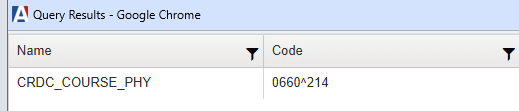
In the case of a list of values, the ^ is used to separate the values. In the below example the State Course IDs (Service IDs in Texas) 0660, 0674 and 0676 are all courses that would be used to determine enrollment in a Physics course in this example district.
LIST DPT IF NM : CRDC_COURSE_PHY
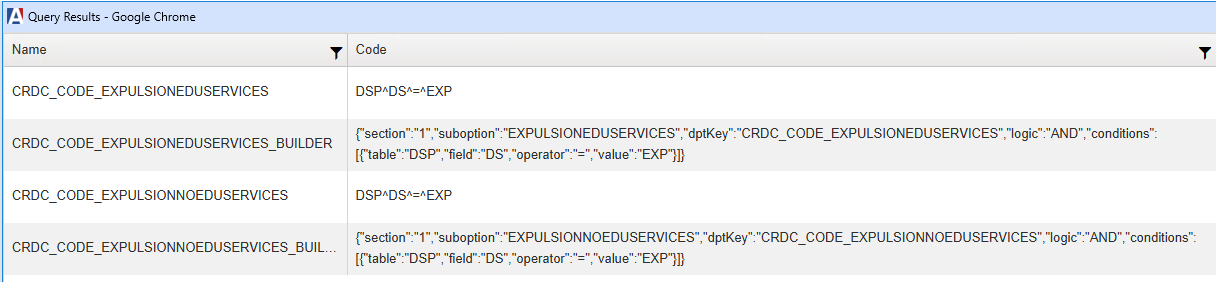
The | symbol means OR. It is used when a specific table and field can have more than one value. In the below example the Expulsion is identified by a record in the Dispositions (DSP) table with the Disposition (DS) field equal to either EXP or EXP-P. The codes are the example district's own, and the stored value is DSP^DS^=^EXP|DSP^DS^=^EXP-P.
LIST DPT IF NM : CRDC_CODE_EXPULSION
The & symbol means AND. It is used when several tables or several fields need to be analyzed. Parentheses group conditions together. In the below example two fields in the Victims (VIC) table are evaluated to determine if there was an allegation of harassment or bullying based on religion. The Victims (VIC) Basis Religion (BB) field must be True, and the Victims (VIC) Type (TY) field must be 01 or 02. The stored value is VIC^BB^=^True&(VIC^TY^=^01|VIC^TY^=^02).
LIST DPT IF NM : CRDC_CODE_ALLEGEDHARASSRELIGION

The table, field and value choices in these examples are only examples of what a district chooses in the Codes section. They are not fixed values.
Options that have not been saved on the Civil Rights Configuration page may still use the earlier format. In the earlier format the table, field and value were separated by ^ with no operator, the ~ symbol separated more than one value for the same field, and the & symbol joined fields. For example, DSP^DS^EXP~EXP-P means the Disposition field equal to EXP or EXP-P.