Overview
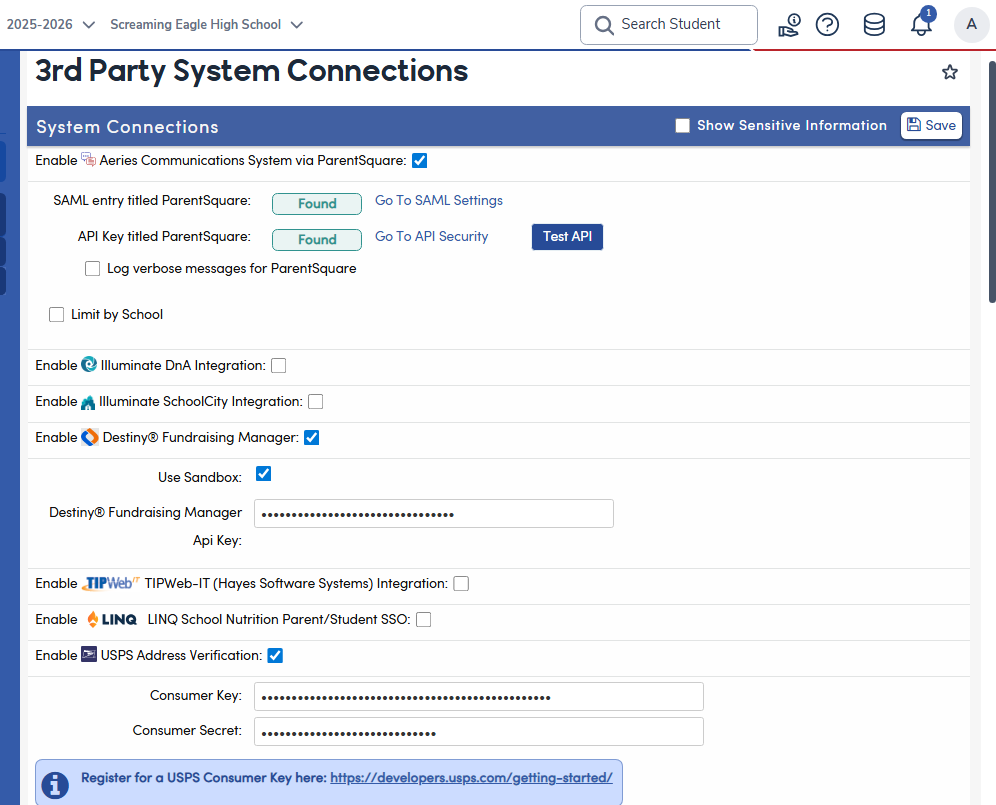
The 3rd Party System Connections page allows Admin users to configure and manage integrations between Aeries and supported third-party systems. This centralized interface streamlines the setup and maintenance of connections to external vendors, ensuring secure and efficient data exchange.
Accessing the Page
Navigate to:
School Info → Configurations → 3rd Party System Connections
Features
- View and manage all available third-party integrations in one place.
- Enable or disable specific vendor connections as needed.
- Enter and update required credentials (such as API keys, Consumer Keys, or Secrets) for each integration.
- Test API connections directly from the interface.
- Access additional configuration options for supported vendors.
- Enable the Illuminate DnA integration to send student data to Illuminate for assessment and reporting purposes.
- This integration does not require setup on the API Security page. Non-hosted districts will need credentials provided by Illuminate to complete setup.
- To use the Zip+4 Lookup Tool on the student address screen, enable USPS Address Verification and enter your USPS Consumer Key and USPS Consumer Secret. Creating a USPS Developer Portal account is free, but as of July 12, 2026 address validation requires a paid USPS subscription and a signed license agreement. For detailed instructions on configuring and using the tool, see the USPS Zip Code Lookup article.
- For step-by-step instructions on configuring integrations that require API Security setup, visit the Product Integration Details.