

COUR-2 – Grade 7 Algebra I Enrollment Indicator
COUR-3 – Grade 8 Algebra I Enrollment Indicator
Student Enrollment in Algebra I Courses
COUR-5 – Grade 8 Geometry Enrollment Indicator
Student Enrollment in Other Math, Science, Computer Science, or Data Science Courses
COUR-22 – Single-Sex Academic Classes Indicator
COUR-23 – Single-Sex Academic Classes Detail
Number of Classes in Specific Subject Areas
Number of Classes in Specific Subject Areas - an unduplicated count of classes (sections) by school for specific Math, Science, Computer Science or Data Science subject areas.
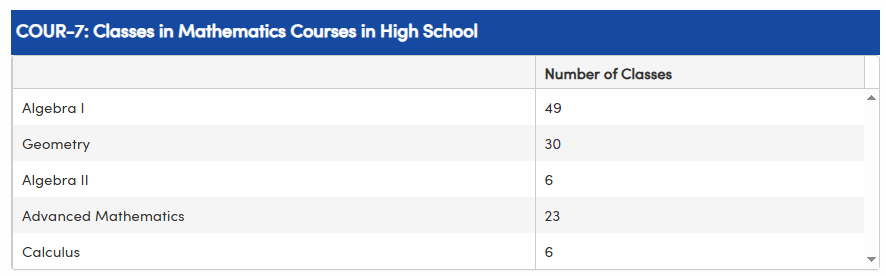
- The qualifying courses are the ones you select for each subject on the Courses tab in 3. Departments, Subject Areas & Courses (School Info > Imports and Exports > Civil Rights Configuration). AP and IB courses are counted when they are selected in one of these subject lists, for example Algebra I or Calculus. The AP Math, AP Science, AP Computer Science and AP Other lists are used for the AP and IB tables, not for these counts.
- Class counts are based on student enrollment (CAR) in the class on the Fall Start Date set in 2. General Settings, for the courses selected for each subject. If your school offers block scheduling, tag those sections in a Master Schedule user field (MST.U1 - MST.U8). In the Block Scheduling row of User-Defined Codes in 2. General Settings, select the Master Schedule (MST) table, that user field and the code value that identifies those sections. Only one code value is used. Those sections are also counted on the Spring Start Date. Fill in all four reporting dates in 2. General Settings.
- COUR-1 – Grade 7/8 Algebra I Classes is limited to classes that include students in grades 7 and 8.
- COUR-7 – Classes in Mathematics Courses in High School, COUR-14 – Classes in Science Courses, COUR-18 – Classes in Computer Science and COUR-20 - Classes in Data Science are limited to classes that include students in grades 9 through 12. A class is counted when at least one enrolled student in those grades is in the school’s enrollment counts.
- This logic pertains to tables:
COUR-1 – Grade 7/8 Algebra I Classes
COUR-7 – Classes in Mathematics Courses in High School
COUR-14 – Classes in Science Courses
COUR-18 – Classes in Computer Science Courses
COUR-20 – Classes in Data Science Courses
COUR-2 – Grade 7 Algebra I Enrollment Indicator ↑
This indicator does not display in the Results section of Civil Rights Processing and Results, but it is populated in the extract with either a Yes or a No. If COUR-4a includes any 7th grade student counts, it will be populated with a Yes, otherwise it will be populated with a No.
COUR-3 – Grade 8 Algebra I Enrollment Indicator ↑
This indicator does not display in the Results section of Civil Rights Processing and Results, but it is populated in the extract with either a Yes or a No. If COUR-4a includes any 8th grade student counts, it will be populated with a Yes, otherwise it will be populated with a No.
Student Enrollment in Algebra I Courses ↑
Algebra I (various grade levels) – an unduplicated count of students enrolled in the courses selected for Algebra I on the Courses tab in 3. Departments, Subject Areas & Courses.


- Students counted will be in specific grade levels and enrolled in the courses selected for Algebra I on the Courses tab in 3. Departments, Subject Areas & Courses. For the Algebra I tables student enrollment counts are taken based on the end of the course. For regular scheduling the count is taken on the Spring End Date. Block scheduling sections are counted on the Fall End Date or the Spring End Date. If your school offers block scheduling, tag those sections in a Master Schedule user field (MST.U1 - MST.U8). In the Block Scheduling row of User-Defined Codes in 2. General Settings, select the Master Schedule (MST) table, that user field and the code value that identifies those sections. Only one code value is used. The program then uses Course Attendance (CAR) to verify that the student was enrolled in the course on the date. Fill in all four reporting dates in 2. General Settings.
- Each student is counted once, at the reporting school of their most recent enrollment (the Reporting Home School (ENR.HS) when one is entered), even if they take the Algebra I class at a different (concurrent enrollment) school. Both the school where the class is taken and the student’s reporting school must be selected in 1. Schools.
- This logic pertains to tables:
COUR-4a – Student Enrollment in Algebra I - Grades 7 & 8
COUR-8a – High School Student Enrollment in Algebra I - Grades 9 & 10
COUR-9a – High School Student Enrollment in Algebra I - Grades 11 & 12
- COUR-4a counts students in grades 7 and 8.
- COUR-8a counts students in grades 9 and 10.
- COUR-9a counts students in grades 11 and 12.
- See ENRL-1 for additional information on demographic breakdowns.
Students who Passed Algebra I ↑
Passed Algebra I (various grade levels) – an unduplicated count of the students included in the Algebra I enrollment counts tables (COUR-4b, COUR-8b, COUR-9b) that passed Algebra I during the CRDC school year.


- Only the students included in the counts for tables COUR-4a, COUR-8a and COUR-9a are evaluated.
- In 2. General Settings, enter Credits Needed to pass Algebra I for Grades 7-8 and for Grades 9-12. A student passes when the credits completed in their Algebra I transcript records for the year add up to at least that number. Enter a whole number, because a decimal value is treated as 0. If a value is 0 or blank, no students are counted as passing for those grades. A box is unavailable when none of your schools have those grades.
- The Transcript (HIS) records that are evaluated are limited to:
- Transcript records for students that were enrolled in Algebra at the end of the school year. If the school is using Blocked classes as defined by CRDC, then it will include students that were enrolled in Blocked classes either at the end of the Fall semester or the end of the school year.
- The transcript year (HIS.YR) is the CRDC academic year
- The transcript course(s) (HIS.CN) are limited to the Algebra I courses selected on the Courses tab in 3. Departments, Subject Areas & Courses. Credits are the sum of Credits Completed (HIS.CC, shown as Cr Cmp) for those records.
- The transcript school taken (HIS.ST) records are limited to the schools that are selected in 1. Schools.
- Each student is counted once, at the reporting school of their most recent enrollment (the Reporting Home School (ENR.HS) when one is entered), even if they take the Algebra I class at a different (concurrent enrollment) school. Both the school where the class is taken and the student’s reporting school must be selected in 1. Schools.
- This logic pertains to tables:
COUR-4b – Students who Passed Algebra I - Grades 7 & 8
COUR-8b – High School Students who Passed Algebra I - Grades 9 & 10
COUR-9b – High School Students who Passed Algebra I - Grades 11 & 12
COUR-5 – Grade 8 Geometry Enrollment Indicator ↑
This indicator does not display in the Results section of Civil Rights Processing and Results, but it is populated in the extract with either a Yes or a No. If COUR-6 includes any student counts, it will be populated with a Yes, otherwise it will be populated with a No.
Student Enrollment in Other Math, Science, Computer Science, or Data Science Courses ↑
Other High School Math, Science, Computer Science and Data Science courses – an unduplicated count of students enrolled in the courses selected in the Algebra II, Advanced Math, Calculus, Geometry, Biology, Chemistry, Physics, Computer Science or Data Science lists on the Courses tab in 3. Departments, Subject Areas & Courses.


- Students counted will be in the specified grade and enrolled in the courses selected on the various Math and Science lists on the Courses tab. The count is taken on the Fall Start Date. If your school offers block scheduling, tag those sections in a Master Schedule user field (MST.U1 - MST.U8). In the Block Scheduling row of User-Defined Codes in 2. General Settings, select the Master Schedule (MST) table, that user field and the code value that identifies those sections. Only one code value is used. Those sections are also counted on the Spring Start Date. The program then uses Course Attendance (CAR) to verify that the student was enrolled in the course on the date.
- Per CRDC guidelines the student enrollment in High School course counts will be applied to their primary enrollment school when they are counted in the class, even if they are taking the class in a different (concurrent enrollment) school.
- Students may be counted in more than one table for the same subject area if they are taking more than one of these courses, for example Geometry and Calculus, or Chemistry and Physics.
- Students enrolled in two or more courses in the same subject list (such as Trigonometry and Precalculus in Advanced Math, or Botany and Genetics in Biology) should only be counted once.
- AP and IB courses are counted when they are selected in one of these subject lists, for example Calculus or Physics. The AP Math, AP Science, AP Computer Science and AP Other lists are used for the AP and IB tables, not for these counts.
- This logic pertains to tables:
COUR-6 – Student Enrollment in Geometry in Grade 8
COUR-10 – Student Enrollment in Mathematics Courses in High School – Geometry
COUR-11 – Student Enrollment in Mathematics Courses in High School – Algebra II
COUR-12 – Student Enrollment in Mathematics Courses in High School – Advanced Mathematics
COUR-13 – Student Enrollment in Mathematics Courses in High School – Calculus
COUR-15 – Student Enrollment in Science Courses – Biology
COUR-16 – Student Enrollment in Science Courses – Chemistry
COUR-17 – Student Enrollment in Science Courses - Physics
COUR-19 – Student Enrollment in Computer Science Courses
COUR-21 – Student Enrollment in Data Science Courses
- COUR-6 – Student Enrollment in Geometry in Grade 8 is limited to classes that include students in grade 8.
- The other tables, COUR-10, COUR-11, COUR-12, COUR-13, COUR-15, COUR-16, COUR-17, COUR-19 and COUR-21 are limited to classes that include students in grades 9 – 12.
- See ENRL-1 for additional information on which records are included in the counts as well as demographic breakdowns. COUR-6 shows a total only.
COUR-22 – Single-Sex Academic Classes Indicator ↑
This indicator does not display in the Results section of Civil Rights Processing and Results, but it is populated in the extract with either a Yes or a No. If COUR-23 includes any class counts, it will be populated with a Yes, otherwise it will be populated with a No.
COUR-23 – Single-Sex Academic Classes Detail ↑
Single Sex Academic Classes – an unduplicated count of classes (sections) by school for various subject areas.

Single sex classes are identified by the Master Schedule Gender (MST.GN) field. A class with an 'M' is counted as male only and a class with an 'F' as female only. Classes are counted on the Fall Start Date, and on the Spring Start Date for block scheduling sections. If your school offers block scheduling, tag those sections in a Master Schedule user field (MST.U1 - MST.U8). In the Block Scheduling row of User-Defined Codes in 2. General Settings, select the Master Schedule (MST) table, that user field and the code value that identifies those sections. Only one code value is used. The program then uses Course Attendance (CAR) to verify that the student was enrolled in the course on the date. Courses whose NonAcademic/Honors code (CRS.NA) is N are not counted.