

Civil Rights Configuration and Civil Rights Processing and Results are both under School Info > Imports and Exports. Two security areas control them.
| Table | Permission | Description |
|---|---|---|
| Civil Rights Data Collection (CVR) | Read | Allows users to open Civil Rights Processing and Results and view the results, student details and Excel exports. A user logged into a school sees the results for that school only. A user logged in at the district level sees all of the selected schools. |
| Civil Rights Data Collection Processing (CRDC_Processing) | Administer | Allows users to open Civil Rights Configuration and save the Civil Rights settings. Allows users to start Process Civil Rights Data & Create File on Civil Rights Processing and Results, see the File Downloads list and download the extract file. |
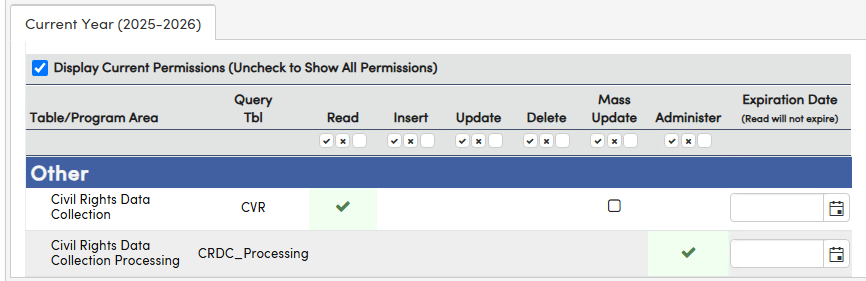
A user who processes Civil Rights data needs both permissions. Civil Rights Configuration and Civil Rights Processing and Results each require Read on Civil Rights Data Collection (CVR), and processing and downloading also require Admin on Civil Rights Data Collection Processing. A group that only needs to review results needs just Read on Civil Rights Data Collection, and those users do not see the process button or File Downloads. Teacher, parent and student accounts cannot use either page, whatever permissions they have.
NOTE: Set up the Civil Rights permissions in the school year you will run Civil Rights in. Security permissions are saved for the school year you are working in. See Security for more detailed information on how to set up permissions for users and groups. Mass Update on Civil Rights Data Collection permission is no longer used by Civil Rights Configuration or Civil Rights Processing and Results. Civil Rights settings are stored once for the whole district.
Civil Rights Data Collection settings and results are stored in the following tables. The Security page does not list CVT or DPT, so you cannot give access to them separately.
- CVR - Civil Rights Data - contains a record of the Civil Rights sections and each student that qualifies along with their demographic flags
- CVT - Civil Rights Data Totals - contains the total counts for each Civil Rights section
- DPT - District Options Table - contains the options and rules set up on Civil Rights Configuration, and the processing log from the last run
The data in the following additional tables is used while processing the Civil Rights report. The tables used also depend on the rules set up on Civil Rights Configuration, for example the table chosen for the discipline, harassment, restraint and exam sections. We recommend that users or groups that have permission to process the Civil Rights report also have Read permission to the areas that these tables fall under, to aid with verifying the results. The names below are the names shown on the Security page.
- Assertive Discipline (ADS), if it is used in your discipline or offense rules
- Assertive Discipline Administrative Actions (Dispositions) (DSP), if it is used in your discipline rules
- Behavioral Emergency (BER), if it is used in your restraint or seclusion rules
- Calendar (DAY)
- College Entrance Tests (CTS), if it is used in your exam rule
- Class Schedule History (Course Attendance) (CAR)
- Course Data (CRS)
- Cross Reference Information (Query Only) (XRF)
- Enrollment History (ENR)
- GATE General (GTE)
- Language Assessment (LAC), California only
- Legal Student Information (LSI)
- Master Schedule (MST)
- No Show Setup (OPT)
- 504 Plans (FOF)
- Retentions (RET)
- School Settings (LOC)
- Special Ed (CSE)
- Special Programs (PGM)
- Student Data (STU)
- Transcripts (HIS)
- Victims (VIC), if it is used in your harassment or bullying rules