

Please reach out to support@jumpro.pe if you have questions about setting up Class Grades for your school.
Fields to Collect may vary depending on your school or district's settings
Fields to Collect / Dropdown Options
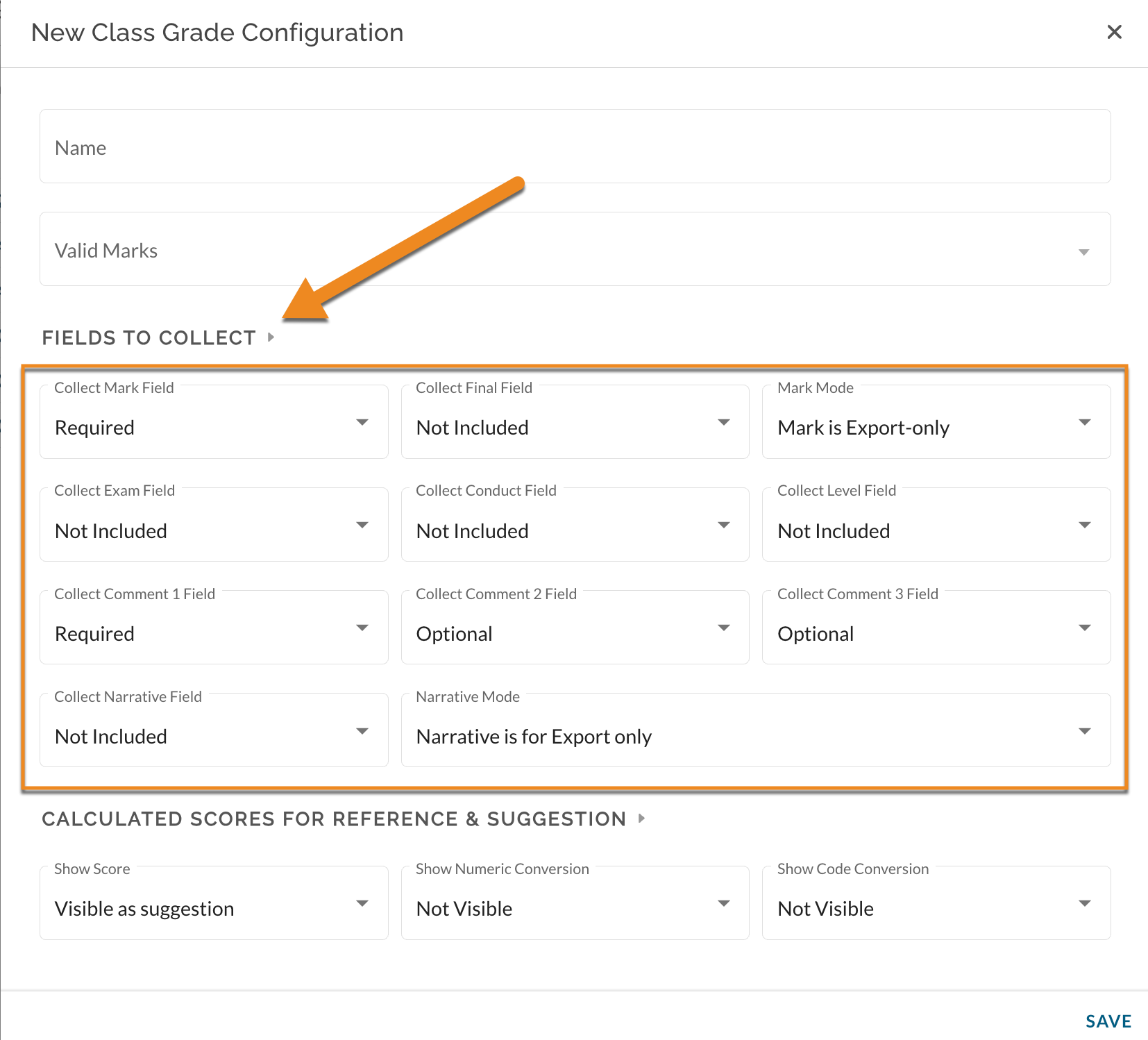
This view is designed to help you identify the different fields where teachers input information. The field options included here directly align with the field options available in the SIS format. Some of these fields have a dropdown menu with the options: "Not Included," "Optional," or "Required." Others have options specific to their nature which are described in detail below.
"Not Included": This field/column will not be visible in Class Grades to teachers.
"Optional": This field/column will be visible in Class Grades to teachers. Teachers can choose whether or not to enter data in these fields.
"Required": These fields/columns will be visible in Class Grades to teachers. They are marked with an asterisk in Class Grades. Teachers are required to enter data into these fields to update their Class Grades Completed stats.
Collect Mark Field
This is the official grade for the class on the report card within this grading period.
Collect Final Field
If "Mark counts as Final" is selected, this value will be the report card grade placed in the student's official transcript regardless of the marking period selected. The value that a teacher puts into the "Mark" field will be ported to this field automatically. *Special caution is warranted.
Mark Mode
Set as Mark is export-only or Mark Overrides Mastery. This mark is used as part of the export file only or this mark overrides mastery in JumpRope impacting JR Progress Reports.
Collect Exam Field
This field is used to highlight the student's exam grade. Oftentimes this field is used for a final exam of the marking period.
Collect Conduct Field
This field is used to highlight the student's conduct. Conduct reference: E,S,N,U.
Collect Level Field
Used to capture the student's level. Level reference 4,3,2,1.
Collect Comment 1 Field, Collect Comment 2 Field, Collect Comment 3 Field
Teachers choose from the DOE's comment codes.
Collect Narrative Field
This is an open text box used for a short narrative based on a student's grade. This field can also be used when creating a narrative comment for JumpRope Progress Reports depending on Narrative Mode selected in next step. *Please note that this is a new and required workflow for capturing narrative comments on progress reports.
Narrative Mode
"Narrative is for Progress Reports & Export": if selected, the written narratives will be used for JumpRope created Progress Reports and the option to download it as part of the school's export file
"Narrative is for Export only" : this is in reference to exporting the narrative to the export file only and it will not be included on JumpRope created Progress Reports
"Narrative is for Progress Reports only" : if selected, the written narratives will be used for JumpRope created Progress Reports only and will be excluded from the export file export out of JR.