

- From STARS, download the following four files in CSV format (more detailed information here):
- 3.07 Student Data
- 4.14 Enrollments
- 4.15 Courses/Sections
- 4.16 Course Catalog/Courses
- Navigate to Admin -> Schedule Imports. Select New Schedule Import from the upper right corner.
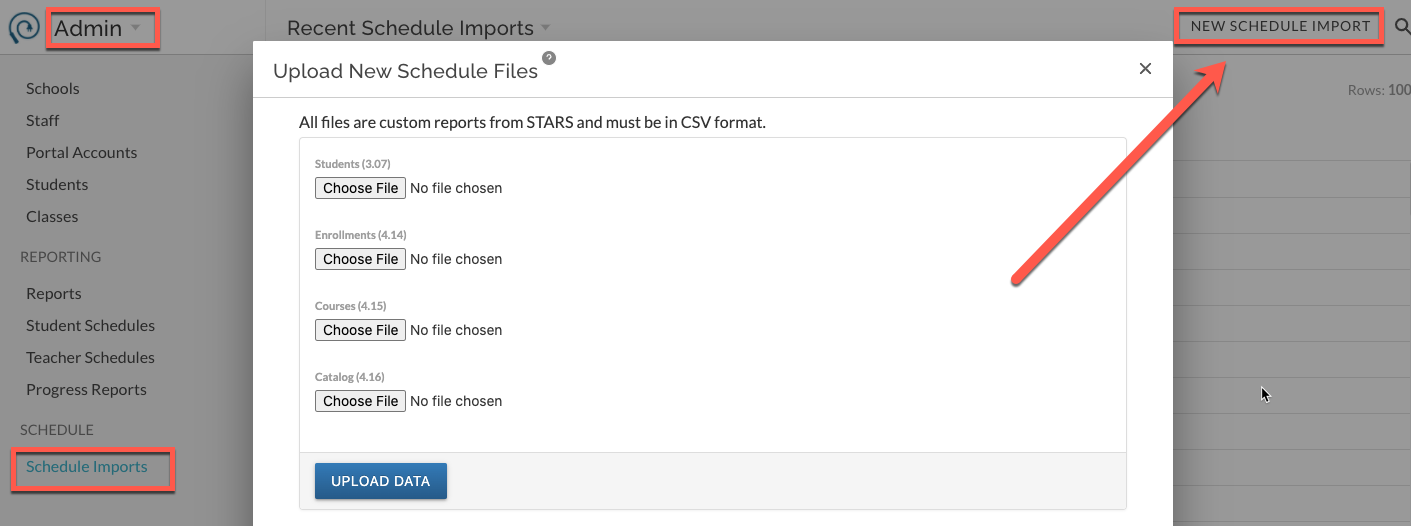
- Click to Upload for each of the four files. Select the correct file for each as outlined in step 1 above.
- Once all 4 files are selected, click on Upload Data/Save.
- Your data import will begin and may take several minutes. When completed, refresh your browser if it does not refresh automatically. You should see the new updates to schedules immediately.
For a more details please see New York Schools STARS Schedule Import.