

Overview
Navigate to Reports > Attendance > Chronic Absenteeism.
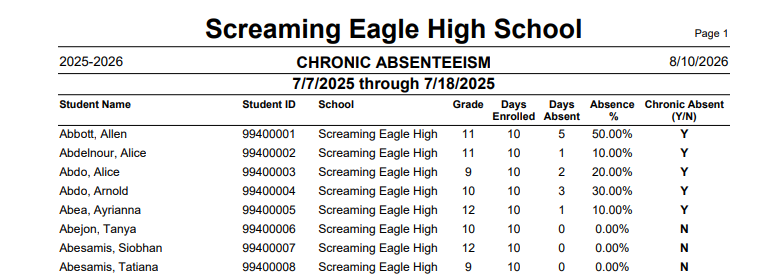
The Chronic Absenteeism report identifies students who meet the chronic absence threshold over a selected date range, following the California Education Code methodology. A student is chronically absent when absent days reach 10% or more of days enrolled. The report is available in CA and TX. It can be run from the District School for one or many schools at once, or from an individual school. Each student is listed with days enrolled, days absent, absence percentage, and a chronically absent (Y or N) indicator.
Security ↑
Table | Permission | Description |
|---|---|---|
Attendance (ATT) | Read | Run Report |
Tables ↑
The report counts each student's attendance day by day across the date range you select, so the numbers reflect exactly that window rather than the full school year. Change the dates and the counts change with them. Along with the attendance totals, the report shows each student's name, ID, grade, and school.
| Table | Field | Description |
| Student Data (STU) | TG | Student status tag. Students with a status tag of * (not yet enrolled) are always excluded. Active students (blank tag) are included by default. Inactive students are included only when "Include Inactive Students" is selected. |
| School Calendar (DAY) | (calendar) | The school's instructional days. |
| Attendance (ATT) | Daily Records | For each day in the range, the student's attendance is evaluated and counted when it qualifies as an eligible absence under the report's criteria. |
| Absence Codes (ABS) | (code setup) | Classifies each day's attendance as excused, unexcused, out of school suspension, or independent study, which determines how it counts toward days absent. |
| School/Location (LOC) | (school info) | School name and number for each selected school. |
Absence Code Configurations ↑
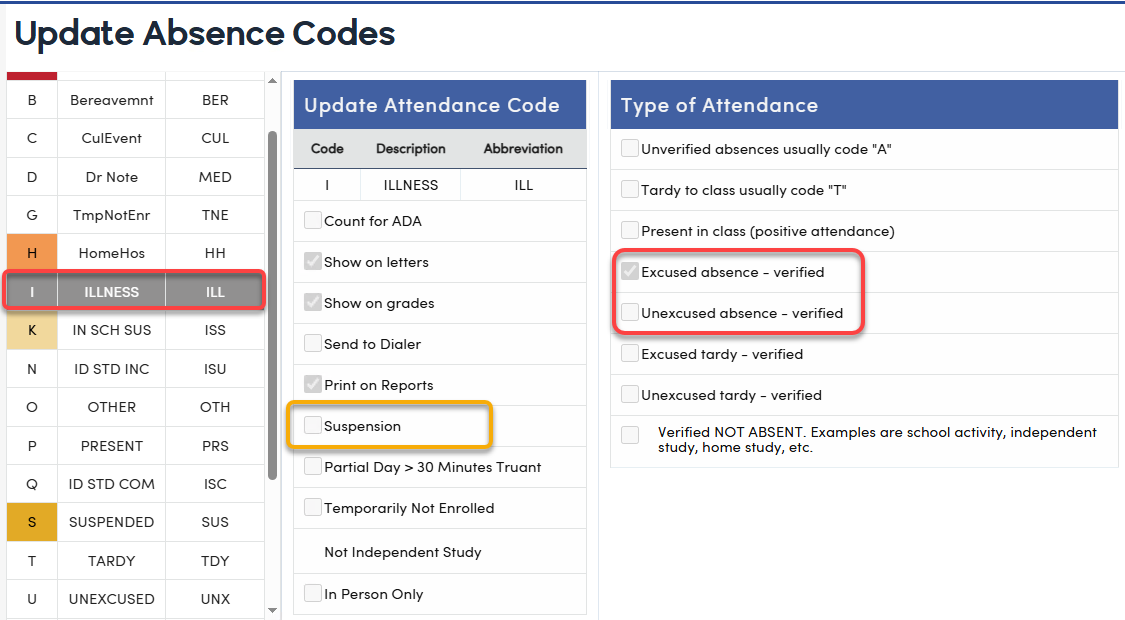
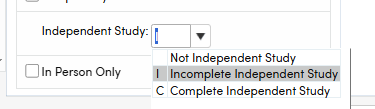
Each of the four absence categories is determined by how the absence code is set up in your district's attendance code table, not by a fixed list of codes. A code counts as excused when its type is set to Excused, and as unexcused when its type is Unexcused and it is not marked as a suspension. A code counts as out of school suspension when it is marked as a suspension and does not count for ADA; a suspension code that does count for ADA is treated as in-school suspension and is not included in the absence total. A code counts as Incomplete Independent Study when it is marked as Independent Study, incomplete. Independent Study - Complete and In-school Suspension are treated as present and are not counted as absences.
Absence Calculations ↑
Days Absent is the total of the following attendance types counted across the selected date range:
- Excused absences
- Unexcused absences
- Out of School Suspension days
- Incomplete Independent Study days (included only when "Include ISI Days" is selected-CA only)
The following are treated as present and are not counted in Days Absent: in school suspension, complete independent study, tardies, and all present days.
Absence percentage = days absent divided by days enrolled, multiplied by 100 and rounded to two decimals. A student is flagged chronically absent when that percentage reaches 10% or higher. The Chronic Absent column will be flagged with a 'Y'.
Report Options ↑
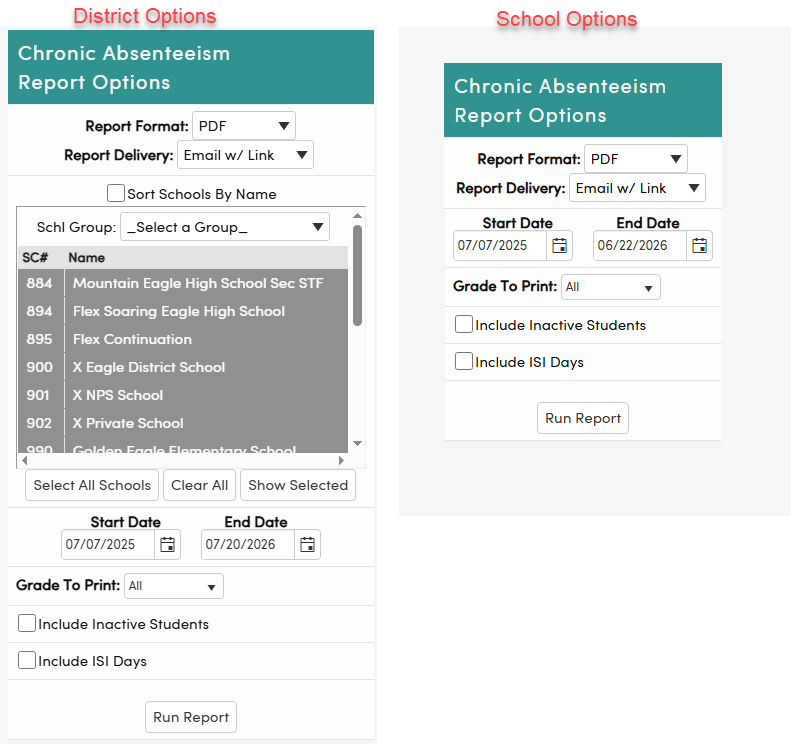
Description of functions in School Options:
- Report Format: Output file format for the generated report. Can be output in PDF, RTF, RTF Word, XLSX, TXT. PDF is the default.
- Report Delivery: How the finished report is delivered. "Email w/ Link" sends an email with a link to the completed report so the user can keep working while it generates.
- Sort Schools By Name: Orders the school list alphabetically by name instead of by school number on the school options only.
- Schl Group: Limits the school list to a predefined school group. Leave on "Select a Group" to see all schools.
- School list: Select one or more schools to include, shown by school number (SC#) and name. Available when running from the District School.
- Select All Schools, Clear All, Show Selected: Select every school, clear the selection, or narrow the list to only the schools currently selected.
- Start Date and End Date: The date range the report evaluates attendance for.
- Grade To Print: Limits the report to a single grade, or "All" for every grade.
- Include Inactive Students: Includes students who are inactive during the date range, such as withdrawn students. Pre-enrolled students are always excluded.
- Include ISI Days: Adds incomplete independent study days (AHS.ISI) to the absence count, switching from the default formula to the ISI included formula.
- Run Report: Generates the report using the selected options.
NOTE: Running the report for a long date range or for multiple schools from the District School can take several minutes, because attendance is tallied from daily records across every day in the range. Use the "Email w/ Link" delivery option for large runs so the report generates in the background. Note also that "Include ISI Days" adds incomplete independent study days to the absence total, which raises absence percentages and may flag additional students as chronically absent. Only enable it when your district's methodology counts incomplete independent study as absent.
Query KEEP/SKIP ↑
This report honors KEEP/SKIP queries. Navigate to Query and enter a query for a group of students. For example, to limit the report to run for students with an IEP.
KEEP STU CSE IF CSE.DI > 000 AND CSE.XD = NULL
Run Query, do not reset. Close the page.
A message will appear at the top of the page indicating students are skipped.
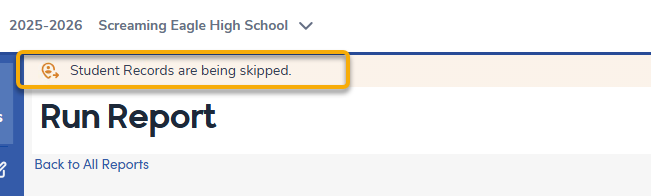
Navigate to Chronic Absenteeism report and generate the report with the desired settings.
Only students kept will be listed in the report.