

Given that your administration has enabled access, your Grade book will offer you the option to edit scores and assessments from the previous school year and/or previous TERM of the current school year. Depending on your schools' settings, you may have access to edit any or all of the following: assessment scores, class override scores, class comments, creation of new assessments, and addition of standards.
Change the TERM view
If enabled, clicking on the current TERM date as shown below will pop up a menu to select other available TERMS and/or years.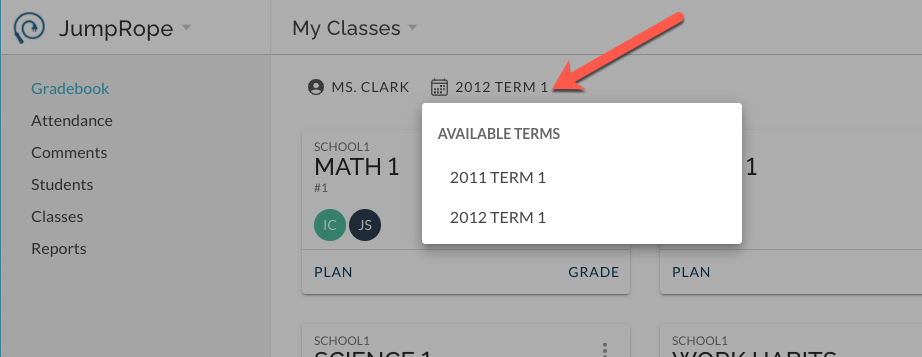
Select the desired TERM and the corresponding class cards will display. Select Grade or Plan on the desired class card.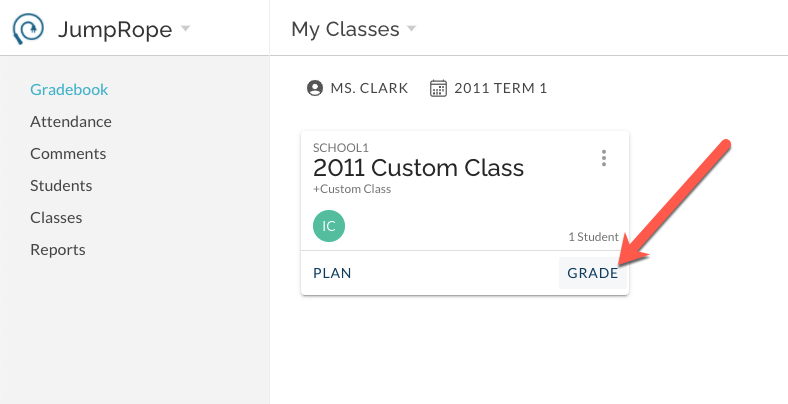
Depending on what has been enabled by your school, you can enter scores, edit scores, create a new assessment, manage class override scores, and manage class comments for this previous TERM/year.
Changing the TERM view for Attendance (if enabled)
From the Classes menu , use the same TERM selector menu to display classes from previous TERMS and/or years. *Note, you cannot use theAttendance menu item to take attendance for a TERM that is over- it will only show you the current default TERM. You must use Classes menu item if you are editing previous TERM attendance.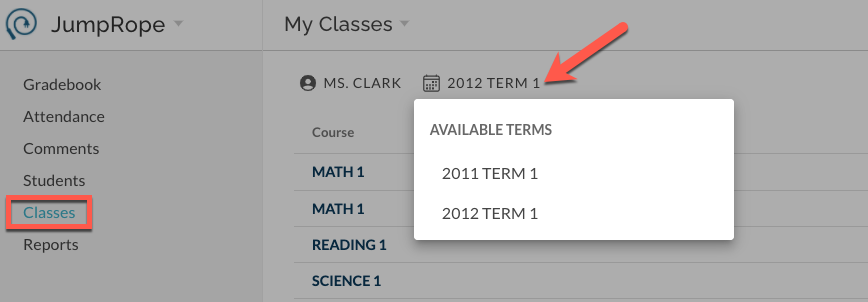
Select the desired class and edit/view attendance.