

Aeries Software allows data to be pulled by authorized vendors through the Aeries API to automatically sync with 3rd Party Applications. This eliminates the need for manual CSV transfers or complicated SFTP uploads.
Cardonex connects to Aeries through an API Certificate unless there is a specific need for an SFTP data upload.
TABLE OF CONTENTS
Configuration ↑
1. Login to your Aeries Admin portal with an Administrator account
2. Navigate to Security -> API Security
3. Select the “Add New Record” button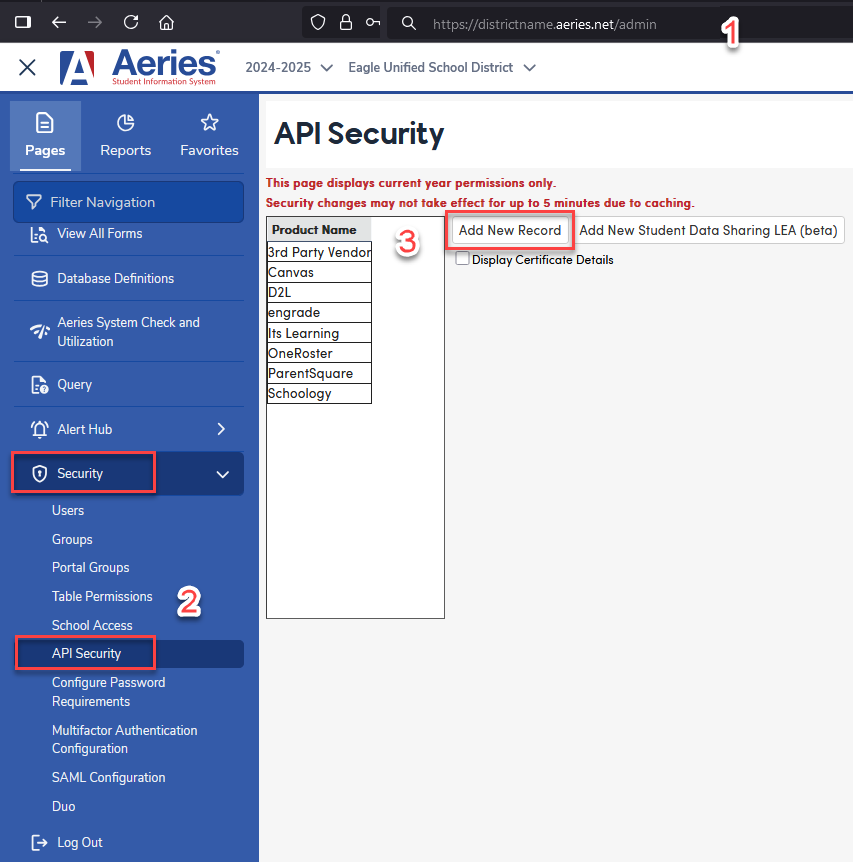
4. Enter the product name "Cardonex" and any comment you’d like.
5. Click 'Insert' to save the Certificate 
Security ↑
6. Grant the following API Permissions;
| Permissions | ||||
| Table/Program Area | Read | Update | Insert | Delete |
| Alerts | ||||
| Send Alerts | ||||
| Commands | ||||
| Trigger Student Pre-Enrollment | √ | |||
| Student Data | ||||
| Student Data | √ | √ | √ | |
| Student Programs | ||||
| Special Programs | √ | |||
| Special Education | √ | |||
| Free and Reduced | √ | |||
| Supplemental Data | √ | √ | ||
| District Supplemental Data | √ | |||
| Contacts | √ | √ | √ | |
| Class Schedules/History | √ | |||
| GATE | √ | |||
| Authorizations | √ | √ | √ | |
| Attendance | ||||
| Absence Code Table | √ | |||
| Attendance | √ | |||
| Attendance History | √ | |||
| Bell Schedule | √ | |||
| Calendar | √ | |||
| Enrollment History | √ | |||
| Counseling | ||||
| Assertive Discipline | √ | |||
| Test Scores | ||||
| Test Scores | √ | |||
| College Entrance Tests | √ | |||
| Other | ||||
| Fees and Fines | √ | |||
| Student Pictures | ||||
| Activities and Awards | ||||
| Gradebook | ||||
| Gradebook Data | √ | |||
| Gradebook Scores | √ | |||
| Gradebook Category | √ | |||
| Gradebook Assignment | √ | |||
| Scheduling | ||||
| Teacher Data | √ | |||
| Staff Data | √ | |||
| Staff Job Assignments | ||||
| Staff Assignments (Classified) | ||||
| Master Schedule | √ | |||
| Course Data | √ | |||
| Classes | √ | |||
| Scheduling Master Schedule | √ | √ | √ | |
| Student Scheduling Schedules (Course Requests) | √ | |||
| Class Calendars | √ | |||
| Flex Periods | √ | |||
| Grade Reporting | ||||
| Grades | √ | |||
| Transcripts | √ | |||
| Graduation Status | √ | |||
| School Information | ||||
| Schools | √ | |||
| Terms | √ | |||
| Users | √ | |||
| Graduation Requirements | √ | |||
| Other | ||||
| Single Sign On (from the 3rd party system) | ||||
| Student Groups |
7. Select the checkbox next to “Display Certificate Details” to view the API Certificate. This is sensitive information and should be treated as such.
8. You’ll need the Certificate, along with your Aeries base URL* to configure the initial connection to Cardonex.
*The "base URL" is the entire web address of your Aeries system leading up to the "/Login.aspx".
In this example, the highlighted text is the "base URL." Your own base URL will be different.

For hosted customers, your base URL will look like https://yourdistrictname.asp.aeries.net/admin or https://yourdistrictname.aeries.net/admin
(replace "yourdistrictname" with your actual assigned URL address. Use the same address you normally use to log in to Aeries.) Self-hosted districts use their own Aeries web address.
Vendor Information ↑
9. More information about Cardonex can be found on the Cardonex website: https://educationadvanced.com/products/cardonex/sis/