

From the Reports navigation tree, search for Extracurricular Activities Listing. The report is available at the school level, and can also be opened with the Report button on the Eligibility tab of the Extracurricular Activities page.
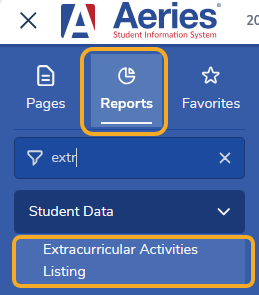
The Extracurricular Activities Listing will provide a listing of all students that have been loaded into the ECA table. This report can be sorted by:
- Student Name
- Section Number
- Teacher Number
- Teacher Name
- Course Title

An option is also available to limit the report by:
- Print All Students who have an ECA record (default)
- All Students who have an ECA record, skip students whose GPA is < 2.0
- All Students who have an ECA record, skip students whose GPA >= 2.0.
The GPA used is the Last Mark Total GPA on the Eligibility tab.

The following report was printed for ALL Students that have an ECA record. On the left side of the report an asterisk displays indicating the student’s GPA is < 2.0. The asterisk legend prints only when all students are printed.

The following report is printing ALL Students who have an ECA record but has Skipped students whose GPA < 2.0.

The following report is printing ALL Students who have an ECA record but is Skipping students whose GPA >= 2.0.

The report can also be sorted by:
- Section Number
- Teacher Number
- Teacher Name
- Course Title.
When sorting by anything other than Student Name, students are listed once for each section they are enrolled in, and a section list is available to limit the report. In this example the report is sorting by Teacher Name and filtering by Teacher. It is also limiting to Skip Students whose GPA < 2.0. The selected section is highlighted.

