

Language Assessment Data – Test History
Language Assessment Data – Other
Language Assessment Data – State Test
Navigate to Student Data > Programs > Language Assessment > State Test tab
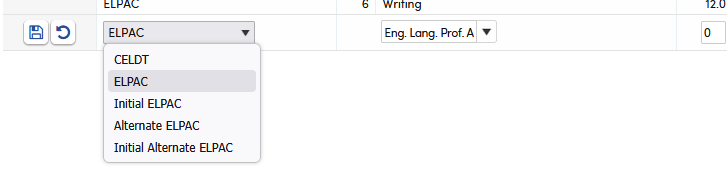
The State Test tab on the Language Assessment page will filter and display the ELPAC, IELPAC (Initial ELPAC), AELPAC (Alternate ELPAC), IAELPAC (Initial Alternate ELPAC), and CELDT data. For Texas districts, it displays the LAS, PRE-LAS, TELPAS, and TELPAS A data. The most recent scores will display at the top. The sort order used on this tab is the Year portion of the Date (TST.TD) descending, then the Test ID (TST.ID), Testing Admin (TST.TA) descending, Part (TST.PT), and Seq (TST.SQ) descending. Seq is not shown on the grid.

This page can be used to enter these scores into the system. New records default to the ELPAC test (TELPAS for Texas districts). The scores are stored in the Test Scores (TST) table: Read permission to TST is needed to see the scores on the tab (without it the tab opens empty), and Insert permission is needed to add scores and Update to change them. Deleting a score requires both Update and Delete, because the Delete button appears only when a record is opened for editing.
Language Assessment Data – Test History ↑
Navigate to Student Data > Programs > Language Assessment > Test History tab
The Test History tab stores hand entered information for “subsequent” tests (those taken after the “initial” test) in order to track the progress of the student. It also stores assessments that were replaced on the LAC screen during the Copy ELPAC scores to LAC process when the new test id is different than the one being replaced. Access to this tab is controlled by the Language Assessment - Tests (LAS) security area. In Texas, the Test History tab displays only if the district has at least one Test History (LAS) record, and the Other tab only if it has at least one Other (LAF) record.

Language Assessment Data – Other ↑
Navigate to Student Data > Programs > Language Assessment > Other tab
The Other tab stores hand entered records of other prior year Language tests that the district would like to track. The past use of this form may have been considered the FLOSEM Score page. Access to this tab is controlled by the Language Assessment - Other Tests (LAF) security area.
