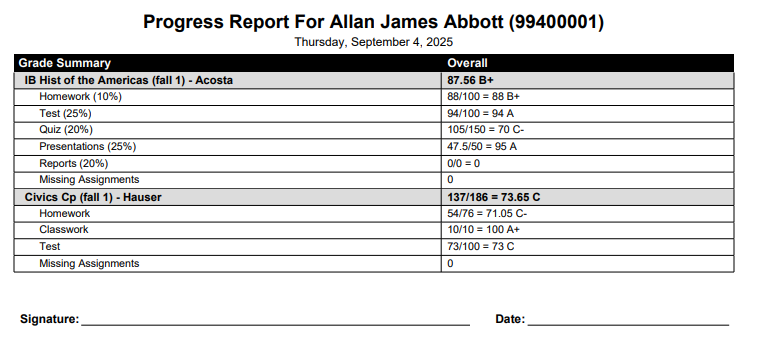

This report lets a teacher see on a single report how each student is doing in all their classes.
To open it from a gradebook, click Reports on the gradebook menu bar, then click Progress By Student under the Progress heading.
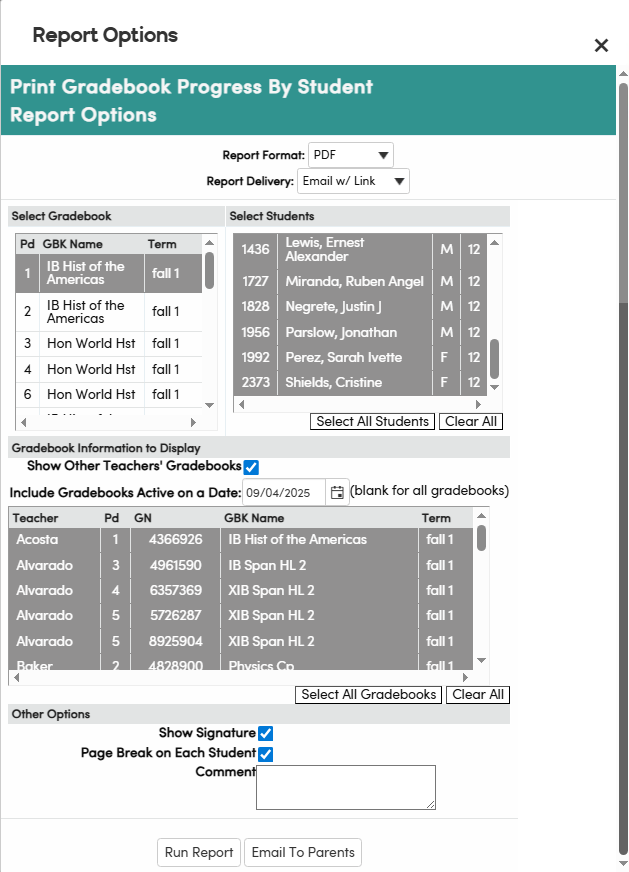
- Select Gradebook – click a gradebook. Its students load in Select Students, all selected. Click a student to deselect or reselect them, or use Select All Students / Clear All. If you opened the report from a student's Scores by Student page, only that student is selected.
- Gradebook Information to Display – Show Other Teachers' Gradebooks (checked by default) includes the students' gradebooks from other teachers. Include Gradebooks Active on a Date defaults to today; leave it blank for all gradebooks. Every gradebook listed is selected; use Select All Gradebooks / Clear All to change this.
- Other Options – Show Signature and Page Break on Each Student are checked by default. Text in Comment prints on every student's report.
Click Run Report to view or print the report. At least one gradebook and one student must be selected.
The Email To Parents button lets teachers email this report at any time to students, parents/guardians and contacts. After you confirm ("Are you sure you want to send this email?"), the emails are sent in the background. The button is not shown to users with read-only access to the gradebook.
For each selected student, one email is sent to every address on file for that student:
- contacts with an email address and Access to Portal set to Yes (CON.AP = 'Y')
- the Parent Email on the student's record (STU.PEM)
- the student's email (STU.SEM)
- Parent Portal (PWA) accounts associated with the student
The email's subject is the student's name followed by "Gradebooks Progress". The report is in the body of the email and also attached as a PDF. When the emails are done, you receive a summary email titled Email Gradebooks Progress by Student Summary listing who was emailed for each student.
The following is an example of the Progress By Student report.