

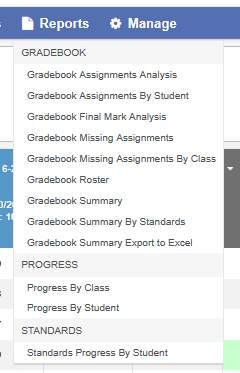
To access Gradebook Reports, open a gradebook and click Reports on the gradebook menu bar.

A drop-down list of reports displays, grouped under Gradebook, Progress and Standards. Click a report name to open its Report Options window. Each report has its own options. When you open a report from inside a gradebook, that gradebook is already selected, and on the Scores by Student page the current student is too.
Your Aeries account must have an email address to run reports. If it doesn't, the Report Options window shows "Your account MUST have an Email Address in order to run a report!"
Teachers can also find gradebook reports in the left navigation under View All Reports, in the Gradebook category. Reports run from there don't have a gradebook selected in advance.