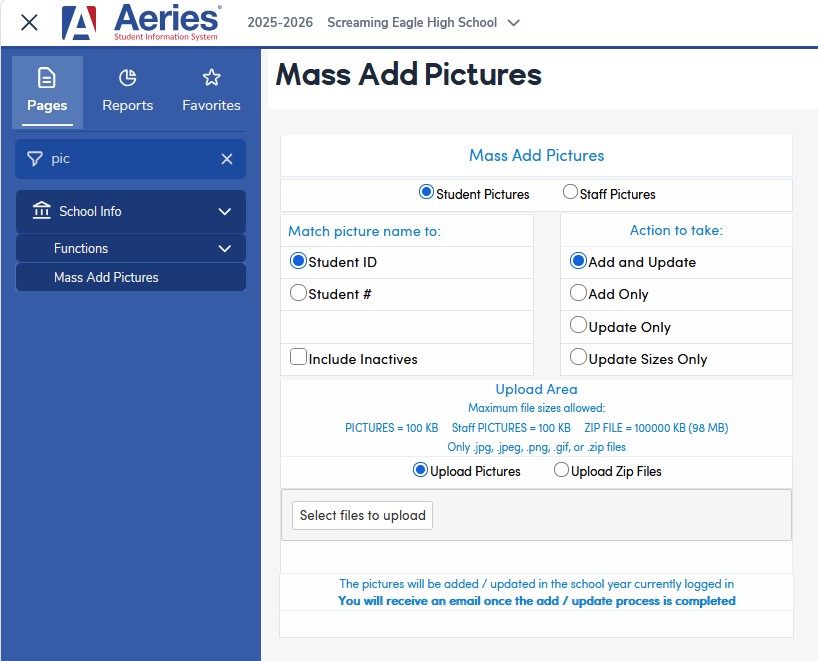

The Mass Add Pictures form will allow you to mass add/update pictures into the Student Pictures (PIC) table for students for the school year you are currently logged in to and into the Staff Pictures (SPC) for staff. The Mass Add Pictures form is available at both the district level and the school level.
For students, the pictures will be matched by the Student ID (STU.ID) or the Student # (STU.SN) which is only available at the school level. The pictures will be stored in the database in the PIC table. If a student does not have a picture for the current year in the PIC table, the most recent picture from a prior year, if available, will display.
For staff, the pictures will match by Staff ID (STF.ID). Ensure that the picture files are named with the correct Staff ID number prior to uploading. The pictures will be stored in the database in the SPC table. The SPC table will store only one picture per staff member and it will not keep a history of pictures per school year.
The Mass Add Pictures form is accessible from School Info | Functions on the Navigation Tree. From the Pages navigation tree, search for keyword picture.