

Overview
The District Grievances page allows Texas district users to record and manage grievance data required for the new TSDS GrievanceExt entity, reported in the PEIMS Summer submission beginning with the 2026-2027 school year.
The page is available under School Info, listed directly below District Events, for administrators logged in at the district (0) level only. It is not available when logged in at a school.
This is a TX-only feature. The underlying GVE, GVA, and GVR tables and the page are not available to California districts.
See also: Ed-Fi Education Organization Field Mapping
Permissions ↑
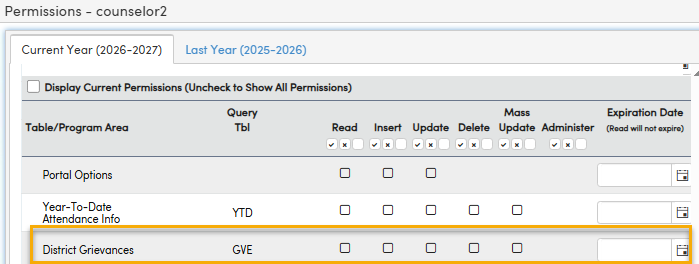
Users will need permissions in order to utilize the District Grievances page:
Tables ↑
| Page | Table |
|---|---|
| School Info > District Grievances | Grievance (GVE) Grievance Corrective Action (GVA) Grievance Level Resolution (GVR) |
Steps ↑
Navigate to School Info > District Grievances
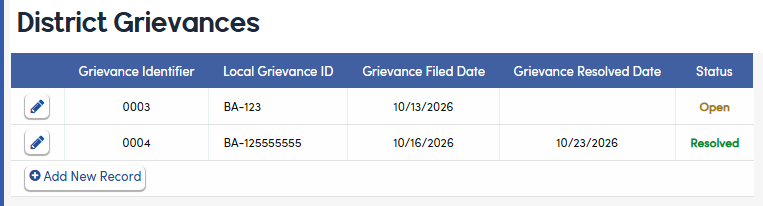
- The page lists each grievance with its Grievance Identifier, Local Grievance ID, Filed Date, Resolved Date, and a Status badge.
- Status displays Resolved when a Resolved Date has been entered and Open when it has not.
- If no records exist, the page displays an empty-state message with no data rows.
Adding a Grievance
- Click Add New Record. A window opens for entering the grievance details.
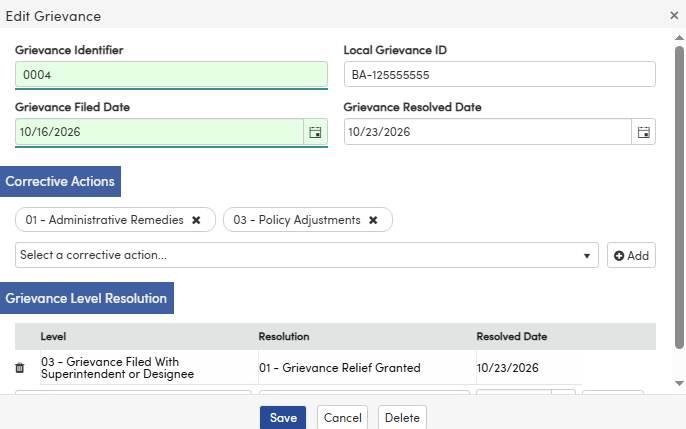
- Grievance Identifier - Automatically assigned by Aeries as the next sequential number for the district. Read-only; it cannot be entered or edited. This is the identifier reported to TEA (GrievanceIdentifier, E3136) and is never renumbered, including across New Year Rollover.
- Local Grievance ID - (Optional) (LID) A free-text field of up to 30 characters for your district's own reference number (for example, BA-01245HK1). Letters, numbers, and special characters such as dashes are accepted. This value is for district use only and is never sent to TEA as part of the GrievanceExt entity.
- Grievance Filed Date - (Required) (FD) The date the grievance was filed. Includes a date-picker control. The grievance cannot be saved without a Filed Date.
- Grievance Resolved Date - (RD) The date the grievance was finally resolved. Leave blank while the grievance is open. Includes a date-picker control. You must enter this date when the grievance is resolved.
- Corrective Actions- (CA) Add one or more corrective actions taken. Each is selected from a dropdown bound to Fixed Codes for TWEDS C364, displayed as a 2-digit code and description:
- 01 – Administrative Remedies
- 02 – Personnel-Related Actions
- 03 – Policy Adjustments
- 04 – Communication and Transparency
- 05 – Procedural Corrections
- 06 – Non-Retaliation Enforcement
- Level Resolutions- Add a row for each appeal level at which the grievance has been decided. Each row has:
- Grievance Level - (LV) A dropdown bound to Fixed Codes for TWEDS C378.
- Resolution of Grievance - (RS) A dropdown bound to Fixed Codes for TWEDS C365.
- Level Resolved Date - (LRD) The date the grievance was resolved at that level. Includes a date-picker control.
Click the delete icon to delete a resolution from the grievance.
Note: A grievance can have a resolution recorded at up to all four levels as it is appealed, but only one resolution per level. Once a level has a resolution, it no longer appears in the Grievance Level dropdown for that grievance.
2. Click Save. The grievance appears in the list with a status of Open or Resolved.
Editing a Grievance
- Click the edit (pencil) icon on an existing grievance. The same window opens, pre-filled with the saved values.
- Make changes, then click Save to keep them, or Cancel to discard them.
- The Grievance Identifier is always read-only.
- The Local Grievance ID can be changed at any time, including after the grievance has been saved.
- The entire Grievance may be deleted by clicking the delete button.
Reporting to TEA (PEIMS Summer)
Grievance records are sent through the Ed-Fi sync as the GrievanceExt entity in the PEIMS Summer submission.
- The reporting period runs from June 1 through May 31. For the 2026-2027 submission, grievances filed from 6/1/2026 through 5/31/2027 are included.
- Unresolved grievances carry forward. A grievance filed in an earlier period continues to be reported each year until a Grievance Resolved Date is entered, and is reported one final time in the year it is resolved.
- A carried-forward grievance is reported under the same Grievance Identifier, so it updates the existing TEA record rather than creating a new one.
- When a grievance is reported, all of its corrective actions and level resolutions are sent with it, including level resolutions dated in earlier periods.
- The Local Grievance ID is never included in the submission.