

File Submission Options and Rules
Extract Specification Overview
Overview
The Education Data Collection System (EDCS) collects AFQT scores for students annually. The purpose of submitting AFQT scores to EDCS is to provide the CDE with statewide data to determine if Armed Services Vocational Aptitude Battery (ASVAB) scores are a valid measure to include in the College and Career Indicator (CCI) as reported on the California School Dashboard. The State Board of Education has requested these data be evaluated to potentially expand the number of career measures in the CCI. For further details on the CCI, refer to the College/Career Indicator web page.
An LEA must submit ASVAB results for students at all schools in the LEA in a single file. Therefore, the LEA will need to identify all the school sites that administer and receive ASVAB scores and coordinate consolidating all the results for the school year to prepare one file to import to EDCS. This work can be done by any staff member.
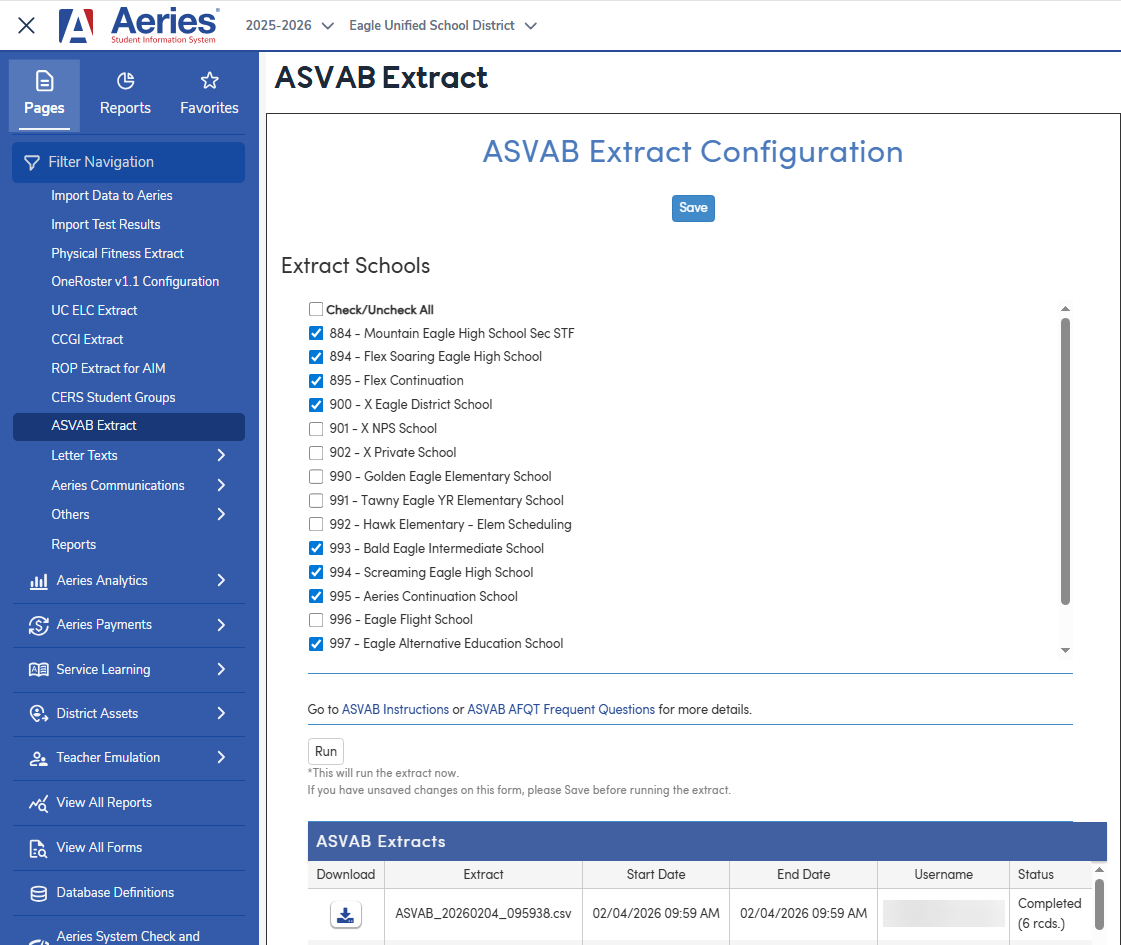
Aeries provides an extract that compiles the highest AFQT score for eligible students into a districtwide file for submission to the California Department of Education (CDE) as part of the ASVAB data collection process.
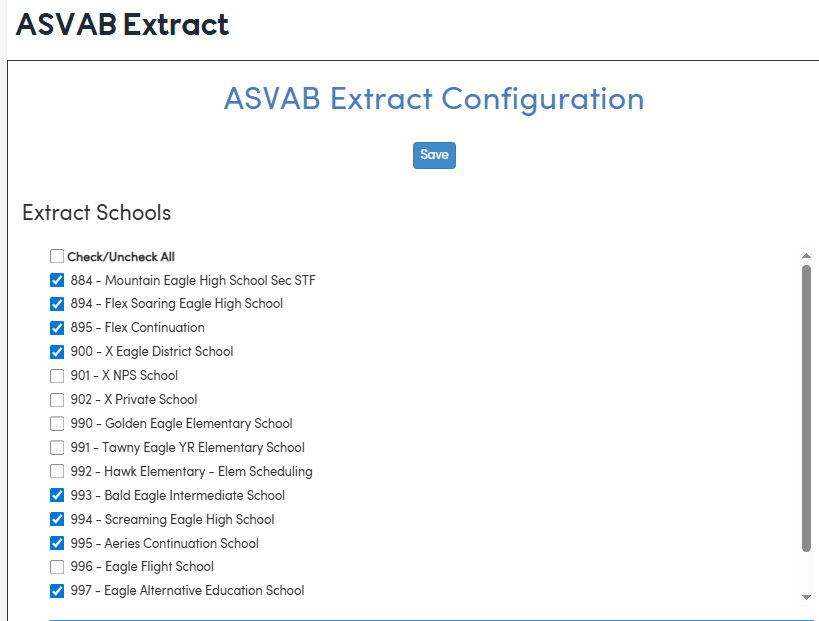
- School selection list (only schools with a full CDS code in School Options - LOC )
- A Run button to generate the extract
- A Download area for retrieving generated files
- A hyperlink that opens to the ASVAB Instructions or ASVAB AFQT Frequent Questions on the CDE website.
Security ↑
Table | Permission | Description |
|---|---|---|
| CA-Regulatory (Not CALPADS) | Administer | Users - Ability to load the form and create ASVAB Extract files; download files Admin - do not need permission and are granted permission by default |
Configurations ↑
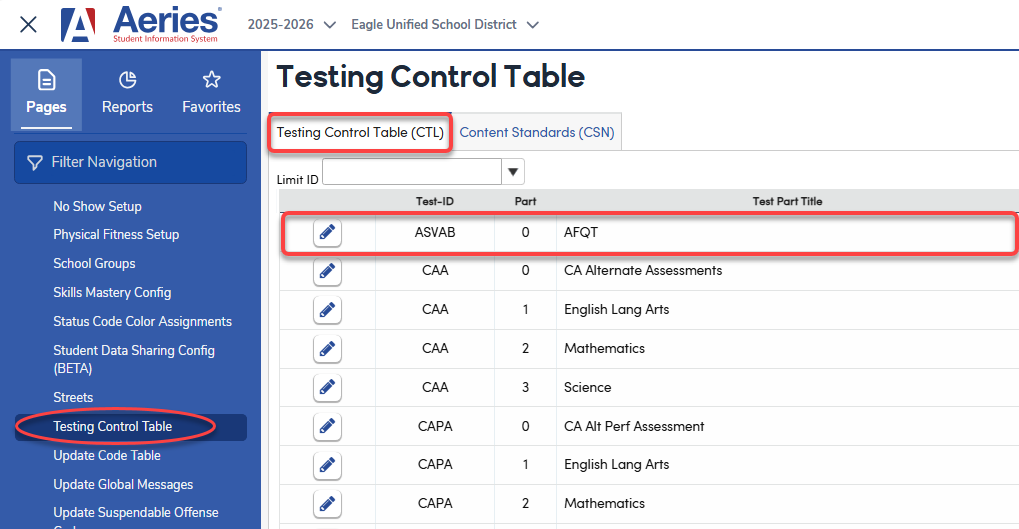
NOTE: For schools that have manually added AFQT scores previously, ensure that the Test ID name is matching to 'ASVAB', the part number = 0, the AFQT score was entered into the Scale Score (TST.SS) field and the TST.GR is populated with a valid grade between 10-12.
School Selection ↑
The school selection consists of schools that have a valid CDS number populated. If a school does not contain a CDS number in LOC, the school will not be listed on the page. A Check/Uncheck All option is available. It's important to select all schools that contain students who may have AFQT scores.
- Selected schools are stored in DPT under:
Extracts_ASVAB_ExtractSchools. - ASVAB test added to the Testing Control Table (CTL) as Part 0 for manual Scale Score entry.
File Submission Options and Rules ↑
- File Submission - All student ASVAB scores must be submitted in one single file. Each upload to EDCS fully replaces the previously submitted file, not just portions of it. This means:
- If you submit a file containing data for one school, and then later submit another file with data for a different school, the second file will overwrite the first.
- If you need to add additional students after an upload, you must make those updates in Aeries by adding the student scores and re-run the extract including all schools, then re‑upload the entire file to EDCS.
- Each new submission completely replaces the prior submission, so ensure your file extract includes all students and all updated data.
- Run Extract - This process generates a comma-delimited (.csv) file at the district level. Per CDE, the file may be a comma delimited, or caret delimited file with a .CSV or .TXT extension.
- Grade Levels - Only students in grades 10-12 will be included in the extract. Grade level is based on the grade level when the student took the test (TST.GR).
- Academic Year - The Extract will only include student scores from the current academic year. Academic Year is calculated from Test Date (TST.TD).
- Student SSID - A student must have a SSID populated in STU.CID in order to be included in the extract file.
Download Extract - Stores the resulting file for district staff to download once the extract completes. This file is ready for importing directly into the EDCS system. - Additional rules
- When a student has taken the test more than once in the same academic year, only the highest score given will be extracted.
- If a student has a leave date, the leave date needs to be within the current academic year in order to extract.
Extract Specification Overview ↑
The table below explains each header used in the ASVAB extract, including the source table, field, and a brief description of the data being pulled. It also identifies where ASVAB‑related information is stored to support accurate reporting.
| Header | Table | Field | Description |
| cds_code | School Options (LOC) | LOC.CC, LOC.DC, LOC.SC | This is the 14-digit unique county, district, school (CDS) code where the student is enrolled. For Charter Schools, include the school code. |
| academic_year | Database Pre-fix i.e. DST25000 | Current Academic Year | This is the academic year when the student took the ASVAB test and obtained a score. Format must be CCYY-CCYY. For example, 2025-2026. You will always be reporting scores received in the academic year the test was taken. |
| ssid | Student Demographics (STU) | STU.CID | This is the 10-digit unique CALPADS Statewide Student Identifier for the student. Students with a blank SSID will not be extracted. |
| grade_level | Test Scores (TST) | TST.GR | This is the student's grade level for the reported academic year. Accepted grade levels are 10, 11 or 12. Grade levels are determined by the Grade Level in the Testing table. |
| score | Test Scores (TST) | TST.SS | AFQT score needs to be entered into the Scale Score field. Accepted score range 0-100. |
| test_date | Test Scores (TST) | TST.TD | This is the date when the ASVAB test was taken, formatted CCYYMMDD. For example, 20260415 |
Here is an example of the CSV file using a text editor:
