

Aeries Reporting Server + Aeries Web Server
This checklist is intended to help identify common configuration and setup issues that can prevent Google Classroom features—such as linking courses, importing assignments, or syncing grades—from appearing or functioning correctly in Aeries.
Each section represents a different layer of the Aeries Google Classroom configuration. The goal is not to complete every step in order, but to use this as a reference to quickly pinpoint areas to review when troubleshooting customer issues.
Aeries Reporting Server + Aeries Web Server ↑
- Private key file (JSON/P12) in Aeries Web Server AppSettings folder & Aeries Reporting Server Service folder
Google Apps Integration ↑
Fully configured with green checks indicating a connection between Aeries and Google.
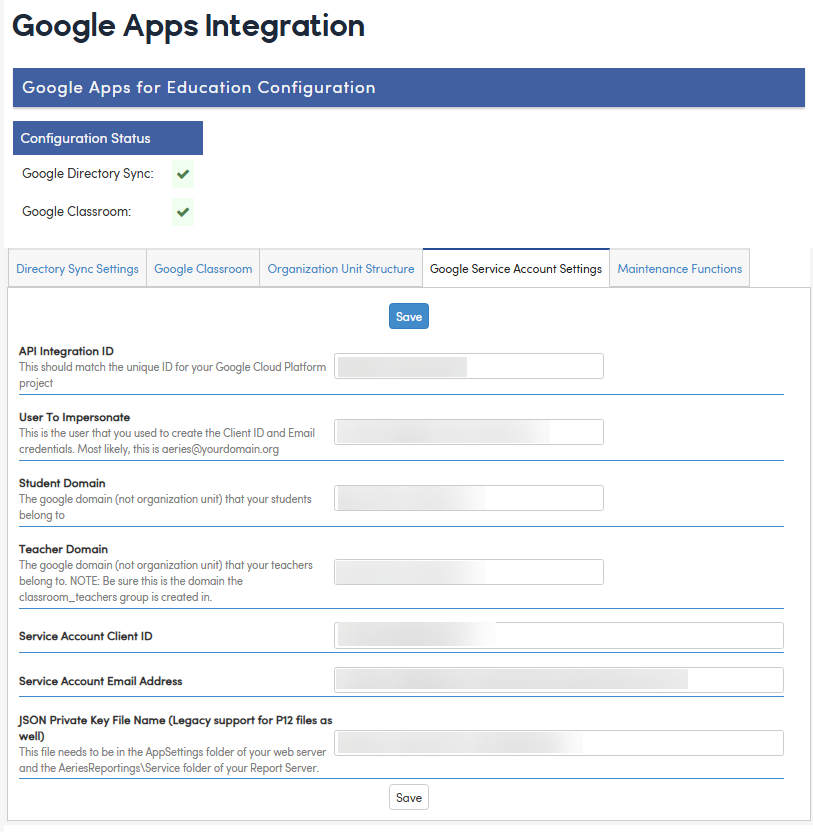
- Private key file name (JSON/P12) matches file on Aeries Reporting & Aeries Web servers
- TeacherDomain configured
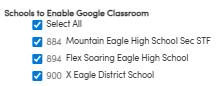
- Teacher's school is enabled on Google Classroom tab -> Schools to Enable Google Classroom
Google Workspace ↑
- Google service account with domain-wide delegation
- classroom_teachers@{domain} group exists
- Teacher is member of classroom_teachers group
- Teacher has Google Workspace account in teacher domain (matching teacher domain on Google Apps Integration Google Service Account Settings)
User Configuration ↑
- Teacher has UGN record with valid EM (email) field
- OR SSO.GEM field populated with Google email
- Teacher's email matches their Google Workspace email exactly
- Teacher has gradebook access (teacher or adteacher user type)
- Teacher is not configured with Read-Only gradebook access
Related Data Setup ↑
- Teacher assigned to sections (MST/TCH records)
- Students enrolled in teacher's sections (SEC records)
- Students have Google accounts (ESI records or pattern-matched)
- Create Google Classroom course(s)
Google Classroom Setup ↑
- Course status is
ACTIVEorPROVISIONED(notARCHIVED/DECLINED)
Additional Assignment Import Pre-reqs:
- Assignments have MaxPoints > 0
10. Key Database Tables
| Table | Purpose | Key Fields |
| SSO | Single Sign-On mappings | UID, GEM (Google Email) |
| UGN | User accounts | UID, SID (Staff ID), EM (Email), UTY (User Type) |
| ESI | External Student IDs | ID, EID (Google ID), EM, TY='Google' |
| MSS | Master Schedule Supplemental | SC, SE, NM='Website_ExternalID', SV (Course ID) |
| GBO | Gradebook Options | SC, GN, OPN='Website_ExternalID', OV (Course ID) |
| GBA | Gradebook Assignments | External ID: "Google,{CourseId},{AssignmentId}" |
| GBS | Gradebook Scores | Student scores imported from submissions |
| TCH | Teachers | SC, TN, ID (Staff ID) |
| STF | Staff | ID, EM (Email) |