

Overview
Overview
The View GPA Calculation page and the GPA Calculations Report are available from the school level and display all information used to determine each student’s GPA when a record exists in either the Built‑in GPA (BGV) table or a custom District GPA (DGV) table.
Running Recompute GPA updates these tables. Each time a student’s GPA is recalculated, the details of that calculation replace any existing record.
NOTE: The ability to view how the GPA was calculated is only available for databases using permanent ID in the Course History (HIS) table. This page and report will not be available in older databases using SC/SN.
All courses completed in grades 9–12, as well as any grade 7–8 courses identified as Off Grade Courses, are included in the GPA calculation. If a course is excluded, a reason for the exclusion is displayed.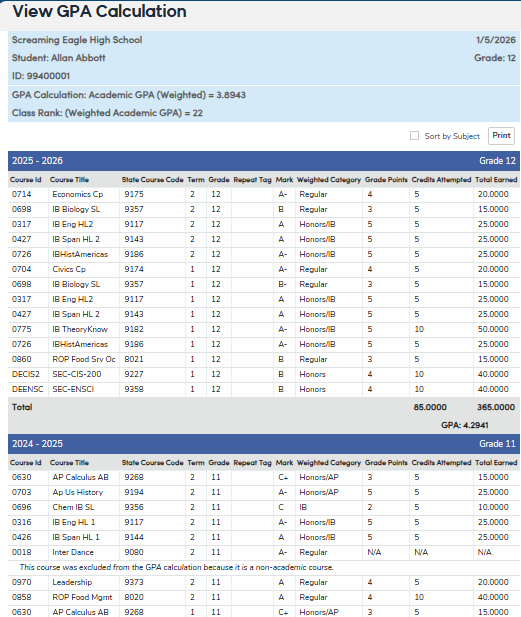
Security ↑
In order to have access to the View GPA Calculation page or GPA Calculation Report, users must have Read permissions to the Transcript View GPA Calculation Button. The report is never available to Parent or Student Portal Groups. However, if any other portal groups have these permissions, they will see the View Calculation button on the Transcripts page and they will be able to view a page of how the GPA was calculated for the students they have permissions to view.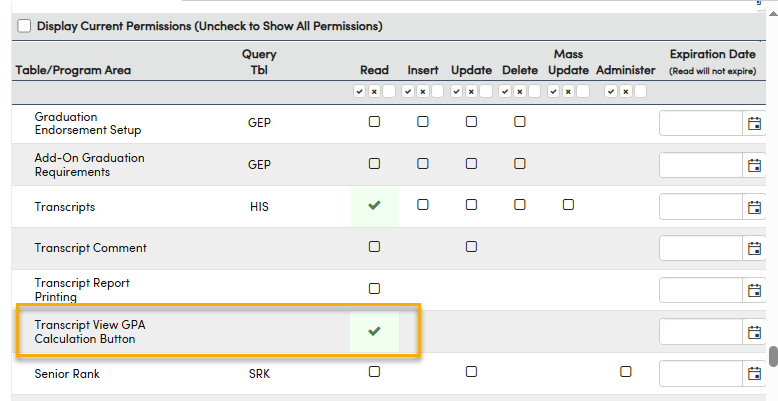
Table | Permission | Description |
|---|---|---|
| Transcripts (HIS) Transcript View GPA Calculation Button | Read Insert Update Delete Read | View page Add new record Update records Delete Records Access to the View Calculation button on the page and when click this button to view the data on the GPA Calculation page. AND Access to run GPA Calculation report from View All reports menu. |
| Built-in GPA View (BGV) | Read | Query BGV Table Only *Users do not need this permission to view the GPA Calculations page or report. |
| District GPA View (DGV) | Read | Query DGV Table Only *Users do not need this permission to view the GPA Calculations page or report if there are active custom District GPA's defined. |
Configurations ↑
- Assign staff Read permissions to the Transcripts page and Transcript View GPA Calculation Button.
- A record must exist in the either the Built-in GPA View (BGV) or District GPA View (DGV) table for students. Recompute GPA to insert records into these tables using any of the following methods:
- Transcripts page > Recompute GPA
- Grade Reporting > Functions > Recompute Cumulative GPAs and Class Rank
- Prepare Senior Preliminary GPA and Class Rank page> Finalize GPA and Class Rank > Recompute GPAs and Class Rank button (Texas only)
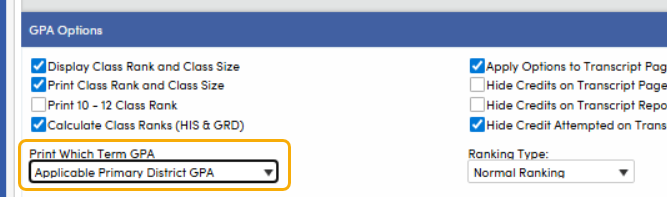
- Print a student's Transcript with a Transcript Definition GPA Option Print Which Term GPA set to Applicable Primary District GPA (District GPAs only)
- Transcripts page > Recompute GPA
Tables ↑
| Table | Description |
| Student (STU) | GPA fields for Aeries Built-in GPAs from the last time the Recompute GPAs and Class Rank was ran |
| Built-in GPA View (BGV) | GPA calculation details for Aeries built-in GPAs |
| Grade Point Average (GPA) | Stores the custom District GPAs and class rank for each student the last time the Recompute GPAs and Class Rank was ran |
| District GPA View (DGV) | GPA calculation details for custom District GPAs |
| Transcripts (HIS) | All transcript (HIS) records |
View GPA Calculation Page↑
Navigate to Grades > Transcripts
Aeries Built-in GPA's
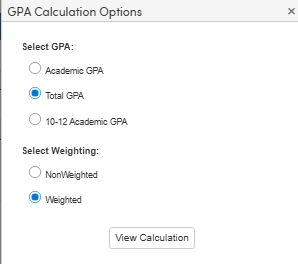
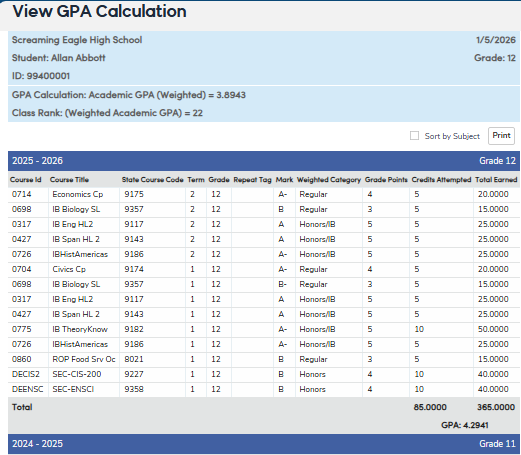
Select the View GPA Calculation button next to the built-in GPA's.
Select a GPA and weight option to view how that GPA was last calculated:
 |  |
NOTE: The GPA calculation detail is only available for the GPAs shown on the transcript page (listed in the table below).
Add-On GPA calculation details and other GPAs (e.g., Grade Reporting, UC/CSU, Cal Grant) are not available.
Transcript GPAs from HIS table available to view the GPA calculation include:
| Field Code | Field Name | GPA Description | Field Code (Name) Weighted Non-weighted | |
| TP | TGPA | Total GPA | STU.TP (TGPA) | STU.TPN (TGPAN) |
| GP | AGPA | Academic GPA | STU.GP (AGPA) | STU.GPN (AGPAN) |
| CP | CGPA | Grades 10 - 12 Academic GPA | STU.CP (CGPA) | STU.CPN (CGPAN) |
Custom District GPA's
Custom District GPAs are created using the GPA Configurations page, which must be turned on by a System Administrator.
See GPA Configurations
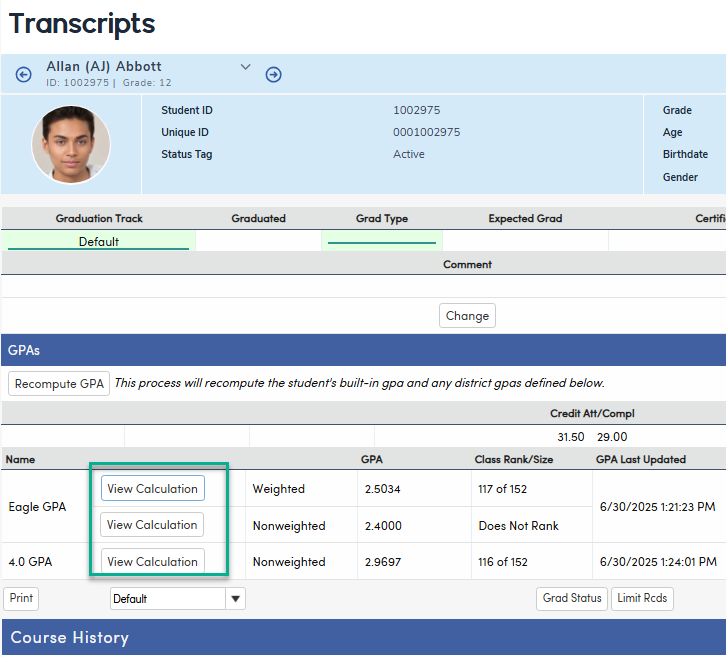
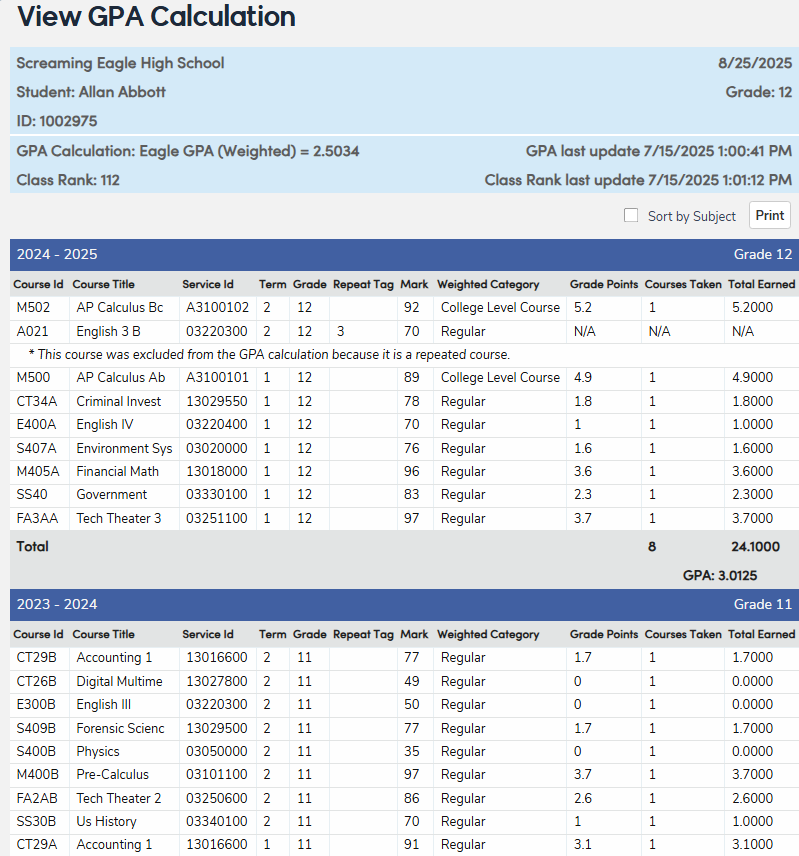
Select the View Calculation button next to the custom District GPA to view how that GPA was last calculated:
 |  |
Selecting the Sort by Subject Area option will summarize the GPA by subject area.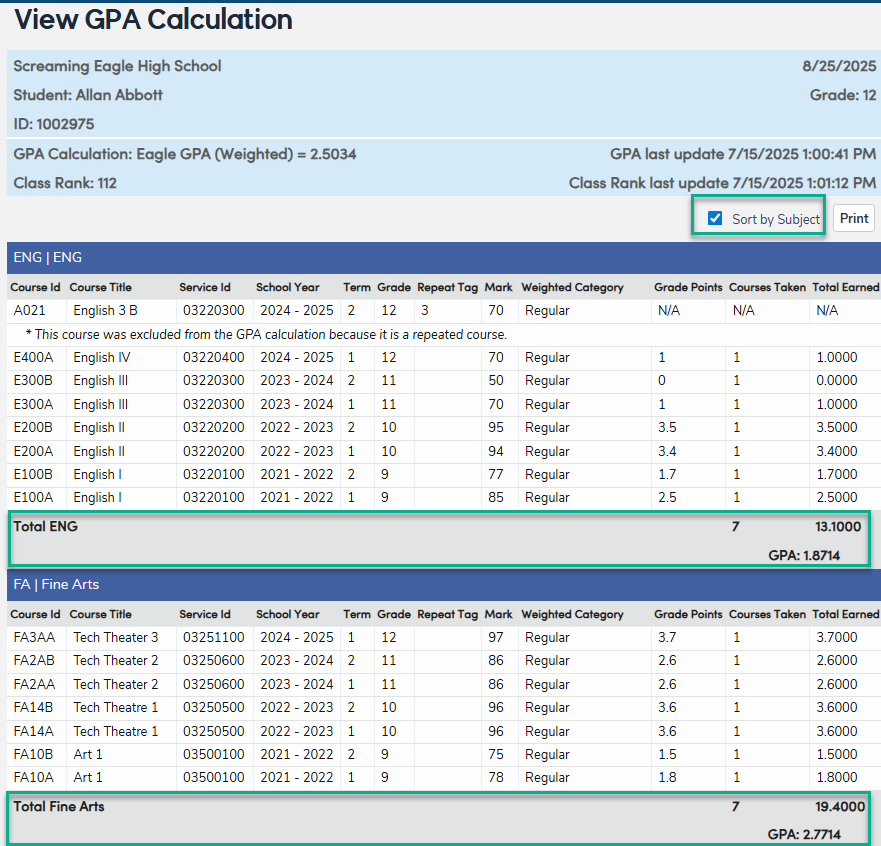
GPA Calculations Report↑
The report may be run for multiple students by grade or counselor for students.
Navigate to Reports > GPA Calculation Report while logged into a school. This report is not available from the district level.
If their are no records in the Built-in GPA (BGV) table for this school, you will see the following message with instructions on how to ensure the GPA calculation details are available.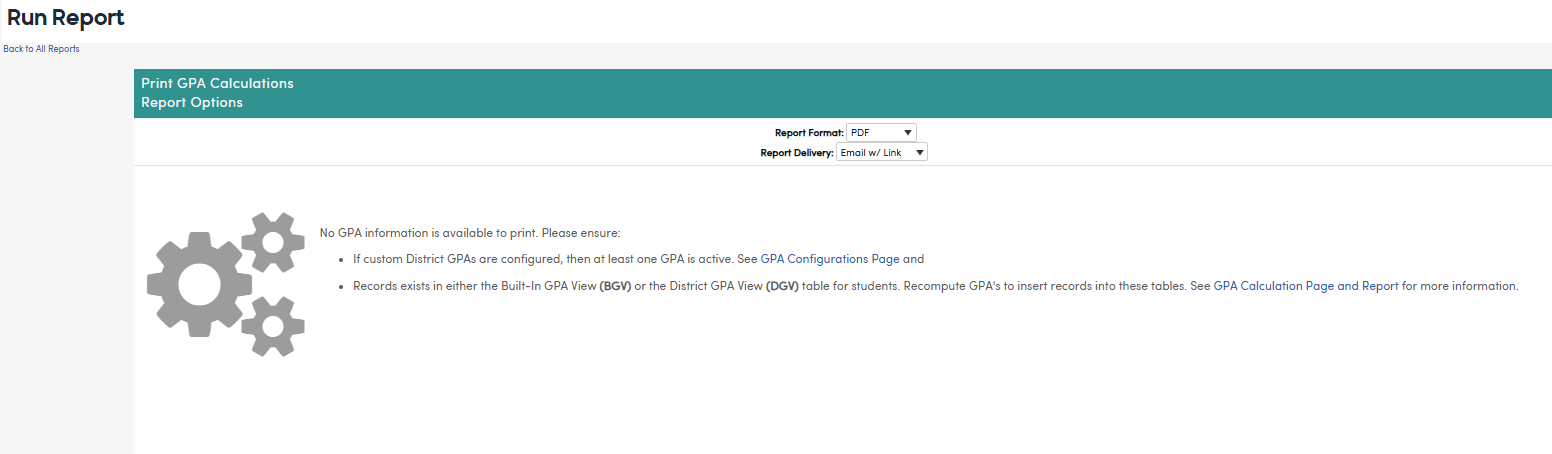
The following options are available:
The report may be run for specific students, grade levels or counselors and will sort by grade level and student name by default.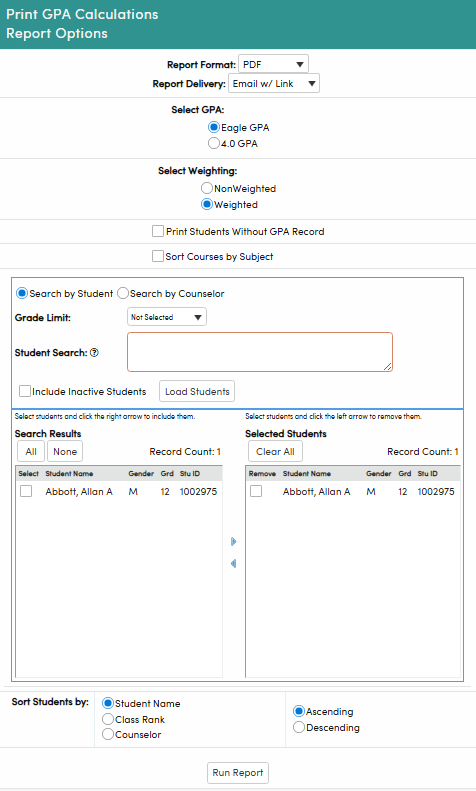
GPA Calculation Details ↑
The following information is available on the View GPA Calculation page and GPA Calculations Report:
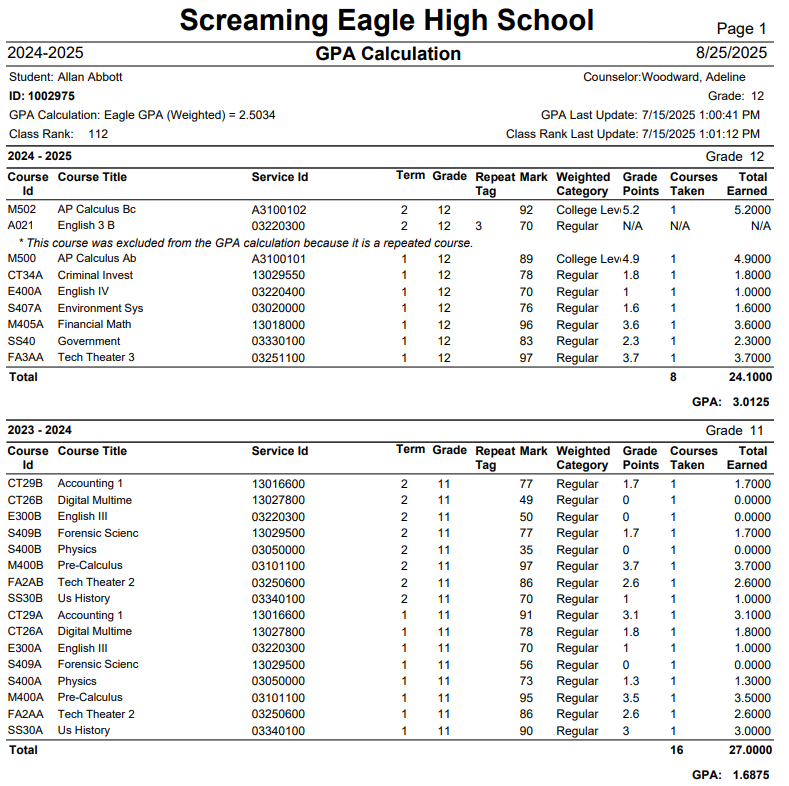
Selecting the Sort by Subject Area option will summarize the GPA by subject area.
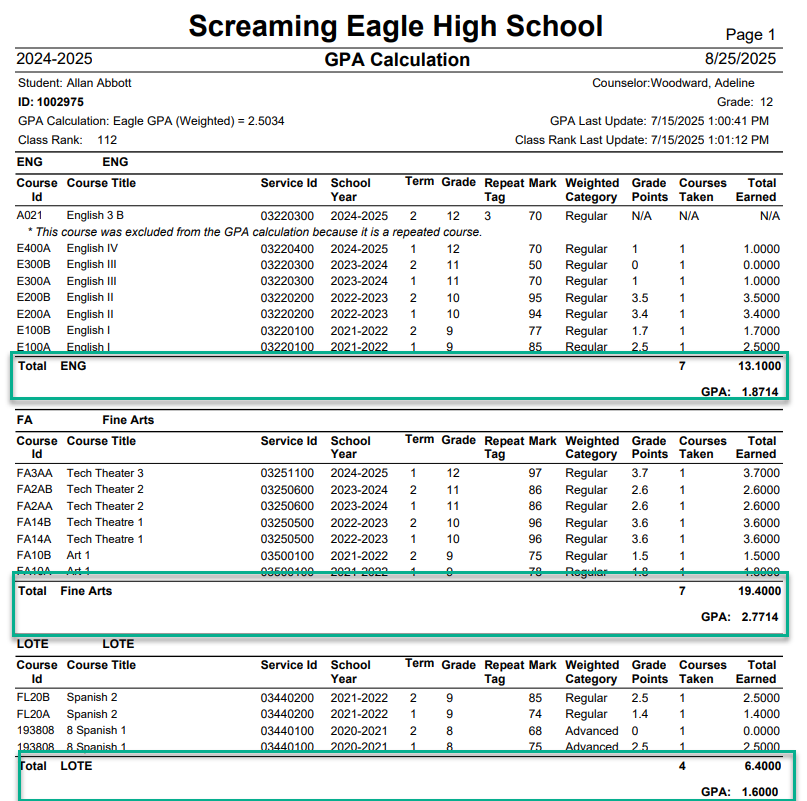
The Report Header includes:
- School Name
- Date report ran
- Student Name and ID
- Student's Current Grade level
- GPA name and value for this student, and Date this GPA was last updated
- Class Rank & Date last updated
Note: last updated information is only available for custom District GPAs.
The Report includes the following details used to calculate the GPA:
- Course ID - The course ID (CRS.CN)
- Course Title - The course title (CRS.CO) from GRD or (CRS.CO/HIS.CO) from HIS for each course
- Service ID or State Course Code - Texas State Service ID (CRS.SVC) or California State Course Code (CRS.C3)
- Term - The term the course was completed
- Grade - The grade level the course was completed
- Repeat Tag - Any repeat tags applicable for this course
- Mark - The grade mark the student earned for this course
- Weighted Category - The name of the GPA Weight Factor scale used based on the GPA Configuration. The default is Regular.
- Grade Points - The total points for each mark specified in the GPA Weight Factors scale.
- Courses Taken or Credits Attempted - based on the GPA Configurationsone of these options will display:
- Courses Taken will = 1 for each course and displays to demonstrate how the Total Earned column is calculated.
- Credits Attempted = the credits attempted from the Grades (GRD) or Transcripts page (HIS)
- Total Earned - this is a calculation of Grade Points x Courses Taken or Grade Point x Credits Attempted based on the GPA Configurations.
- A summary total of Courses Taken or Credits Attempted and Total Earned by Academic Year or Subject Area is displayed and the GPA is calculated as follows:
- For Courses Taken the GPA is - sum of Total Earned / sum of the number of Courses Taken
- For Credits Attempted the GPA is - sum of Total Earned / sum of the Credits Earned
- Reasons a course was not included:
- *This course is excluded from the GPA calculation because it is a repeated course.
The course has a Repeat tag on the Transcripts page (HIS.RT) that indicates not to include in GPA. - *This course is excluded from the GPA calculation as specified in the Course Selection settings on the GPA Configurations page.
GPA Configurations > District GPA Details > Course Selection = Courses In this example, only courses where the User 1 (UC1) field = 25 will be included in this GPA calculation. All other courses will display this reason for not being included in the GPA calculation.
 - *This course has a characteristic excluded from the GPA Calculation, as specified on the GPA Configurations page.
GPA Configurations > District GPA Details > Course Characteristics In this example, only courses with the course characteristic (CCH) = 'Include in GPA Calculation' will be included. All other courses will display this reason for not being included in the GPA calculation. See Course Characteristics & Transcript Indicators
 - *This course has a characteristic excluded from the GPA Calculation, as specified on the Transcript page.
Transcripts > Characteristics
There is a Course History Characteristics (CHC) excluding the course from the GPA Calculation.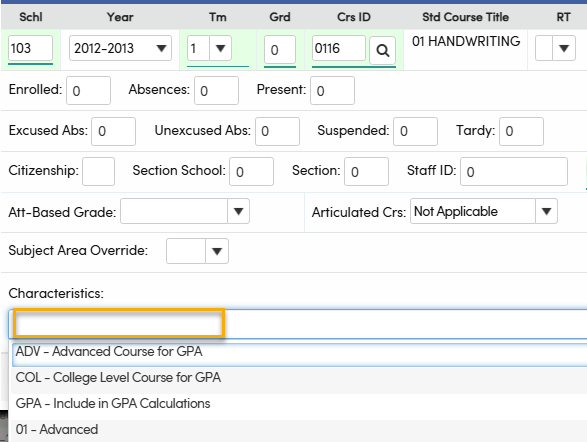
- *This course is excluded from the GPA calculation. Only the highest-mark courses in this subject were included, up to the maximum allowed credits, as per Board Policy.
GPA Configurations >Subject Area Thresholds
Subject area thresholds are setup and this course was excluded due to the threshold being met.
For example, only 4 English courses may count in the GPA and the student had 5.
- *This course has a mark value excluded from the GPA calculation, as specified on the GPA Configurations page.
GPA Configurations >GPA Weight Factors
The grade mark is set to 'Do Not Include in GPA' or the grade mark is not a mark listed.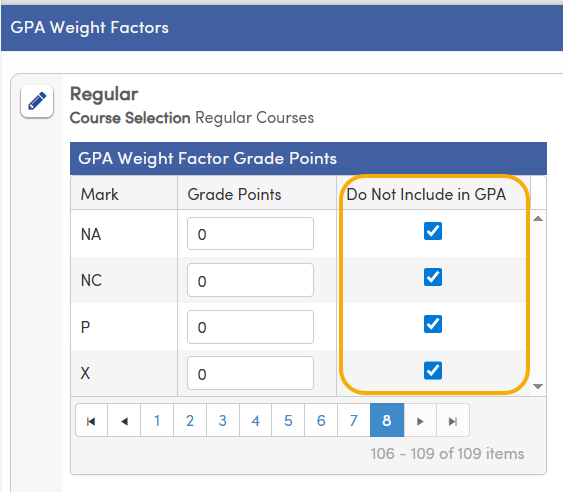
- *This course was excluded from the GPA Calculation because this grade mark is excluded on the Valid Marks page.
The grade mark options Count in GPA Computation or Count As Attempted are set to No
OR
The students Grade on the Transcript (HIS.GR) = X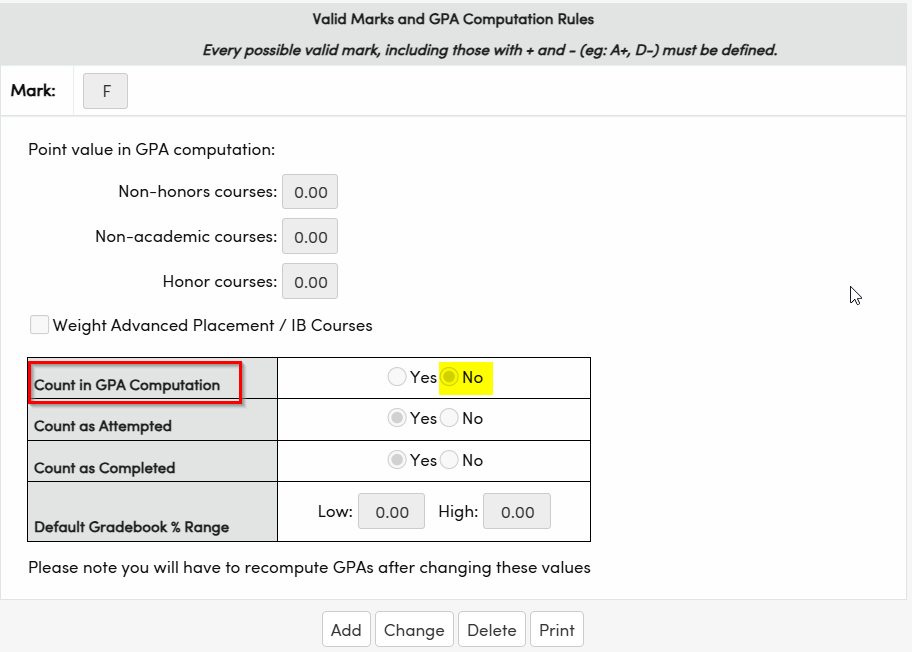
- *This course was excluded from the GPA Calculation because it is not defined in the Off Grade Course Table.
Students who take a course outside the normal grade and the course does NOT exist in the Off Grade Course Table (OGC) table. - *This course was excluded from the GPA Calculation because it is an Off Grade Course set up to not count in the GPA calculation or Overall Credits.
The course is in Off Grade Course Table (OGC) but the Count in GPA (OGC.CP) = No (false) or the Count In Overall Credits = No (False) +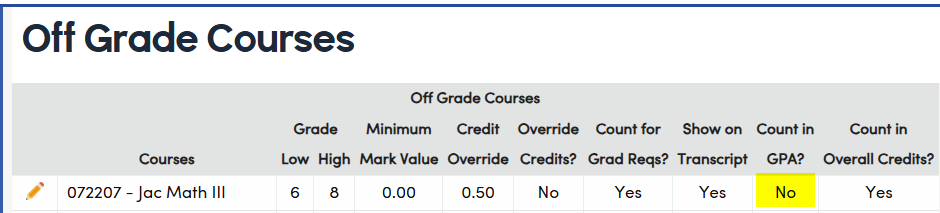
*This course was excluded from the GPA Calculation because the mark value did not meet the minimum required defined in the Off Grade Course table.
The grade mark (HIS.MK) received for this course does not meet the minimum Mark Value on the Off Grade Course Table (OGC) set up for that course.*This course was excluded from the GPA Calculation because it is a College Credit Only course.
Course is designated as College Credit Only (CRS.CL=23)*This course was excluded from the GPA Calculation because it is a non-academic course.
The Academic GPA excludes all non-academic courses. A non-academic course is any course that has an “N” in the NA field of the Courses (CRS) table. (CRS.NA = 'N')
*This course was excluded from the GPA calculation because it was completed prior to grade 10.
This exclusion only applies to the Grades 10-12 Academic GPA (AKA the College GPA). This GPA excludes all non-academic courses and all courses taken prior to grade 10.
- *This course is excluded from the GPA calculation because it is a repeated course.