

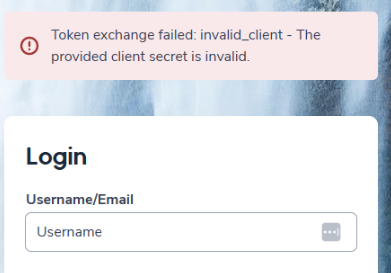
Users are unable to sign in using Single Sign-On (SSO). When selecting the SSO login option, the sign-in fails and an error message appears:
- “Token exchange failed: invalid_client – The provided client secret is invalid.”
This issue typically affects all users (administrators, staff, students, and parents) and prevents access through SSO.
Environment
- Authentication method: Google Single Sign-On (OAuth/OIDC)
- Browser: Any supported browser
- Portals: Admin, Teacher, Student, or Parent
Cause
- The Google client secret saved in the system no longer matches the active client secret in Google. This usually happens when the secret is changed or regenerated in Google Cloud Console but not updated in the system.
- If applicable, Google may not yet recognize newly added redirect (callback) URLs. Google can take time to apply these changes, and redirect URLs are case-sensitive.
Resolution
- In Google Cloud Console, create a new client secret for the existing OAuth application.
- Update the Identity Provider settings to use the new client secret.
- Confirm that all required redirect (callback) URLs are entered in Google Cloud Console for each portal (Admin, Teacher, Student, Parent). Make sure the URLs match exactly, including capitalization.
- Wait several minutes for Google to apply the changes, then test SSO login for each portal.
Workaround
If applicable, while waiting for Google to fully apply new redirect URL changes, SSO may temporarily continue to work using older callback URLs. Once Google finishes applying the updates, confirm the new redirect URLs so the system can switch fully to them.