

The OneRoster 1.1 standard uses OAuth 2.0 Bearer Token Authorization to grant access to the OneRoster API. This section details the steps required to obtain and utilize the access token.
Acquire Access Token: Client Credentials Flow
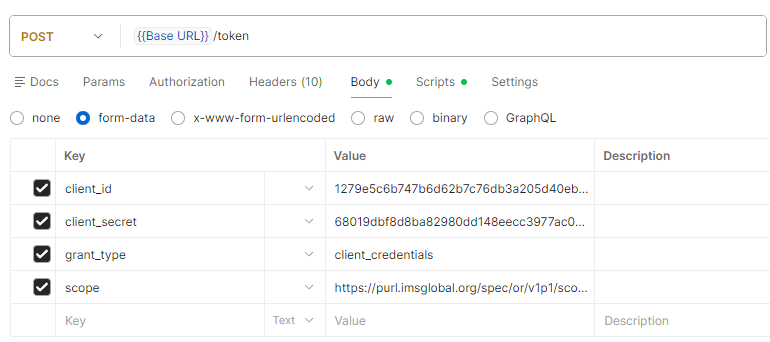
Issue a POST request to acquire an access token. Scopes MUST be included in the request. The Response will include the scopes authorized. It is not necessary to request all scopes, but a minimum of one must be included. At this time there is no /resources or /delete endpoints.
URL: base URL + /token
Example: https://district.aeries.net/aeries/token
Request :
Response:
{
    "access_token": "ccfc1cc84a1b6163be0fc96145c46335",
    "token_type": "bearer",
    "expires_in": 21600,
    "scope": "https://purl.imsglobal.org/spec/or/v1p1/scope/roster-core.readonly https://purl.imsglobal.org/spec/or/v1p1/scope/roster.readonly https://purl.imsglobal.org/spec/or/v1p1/scope/roster-demographics.readonly https://purl.imsglobal.org/spec/or/v1p1/scope/resource.readonly https://purl.imsglobal.org/spec/or/v1p1/scope/gradebook.readonly https://purl.imsglobal.org/spec/or/v1p1/scope/gradebook.createput https://purl.imsglobal.org/spec/or/v1p1/scope/gradebook.delete"
}
Make a request
With a valid access token, data may be requested from the OneRoster API provided that permission has been granted to the underlying security area by the Aeries Administrator. The URL is constructed as described in the Available Endpoints article.
URL: base URL + root URL + version + endpoint
Example: GET https://district.aeries.net/aeries/ims/oneroster/v1p1/orgs
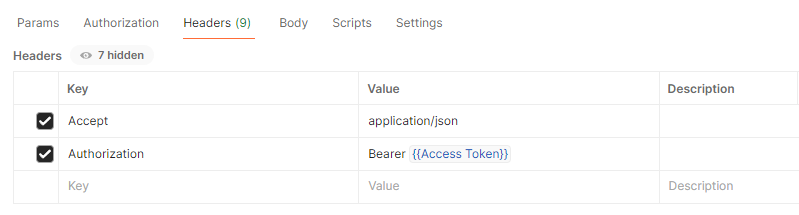
Request Headers:
Response:
{
    "orgs": [
        {
            "name": "Eagle Unified School District",
            "type": "district",
            "identifier": null,
            "parent": null,
            "children": [
                {
                    "href": "~/ims/oneroster/v1p1/orgs/894",
                    "sourcedId": "894",
                    "type": "org"
                },
                {
                    "href": "~/ims/oneroster/v1p1/orgs/994",
                    "sourcedId": "994",
                    "type": "org"
                }
            ],
            "sourcedId": "0",
            "status": "active",
            "dateLastModified": "2025-05-01T05:00:20.097Z",
            "metadata": null
        },
...